ESP32: add login auth to your web server (session cookies, the right way)
Add username and password login to an ESP32 web server with session cookies, random tokens, and logout. Self-hosted, no third-party identity provider, honest limits stated.
The sensor dashboard from the earlier web server tutorial has a flaw that takes most people a year to notice: anyone who joins your Wi-Fi can see it. Every roommate, every guest, every laptop that ever connected. The garage door toggle page has the same flaw, which is worse, because the garage door is a physical thing. This tutorial adds login: a credentials form, a session cookie, and routes that refuse to talk to strangers.
The trap: most ESP32 “auth” tutorials hard-code a check in one
handler and forget the other five. You log in, you read the
temperature page, then you discover the /api/set endpoint never
heard of passwords. The fix is a single check that runs on every
protected route (a helper function the handlers call first), not
per-route willpower. I built the per-route version once and found the
unprotected endpoint three months later while showing the dashboard to
a neighbor.
This is a LAN auth scheme, and honesty about its limits belongs up front. Hard-coded credentials plus rotating session tokens is fine for a home network you control. It is not fine for anything internet-facing (e.g. a port-forwarded dashboard): plain HTTP on the wire, no rate limiting, and a chip that cannot hold real secrets. For exposure beyond your router, put a reverse proxy with real TLS in front, or do not expose it at all.
What you need
Needed
- ESP32 dev board with Wi-Fi (about $8).
- Arduino IDE with the ESP32 board package installed.
- The web server from the ESP32 sensor dashboard tutorial (any WebServer-based sketch works; the example here is standalone).
Nice to have
- Multimeter, if you are wiring a physical toggle to protect (a garage door relay, e.g. the one from the relay tutorial).
- Soldering iron + solder, only if your relay module ships bare header.
- Iron stand and helping hands, for that header work.
- Anti-static wristband, for handling the bare ESP32 module.
- Magnifying goggles, for reading pin labels on relay boards.
- Soldering mat, when the iron comes out.
- Wire stripper, for relay wiring.
- Breadboard and jumpers, for the relay test circuit.
Wiring
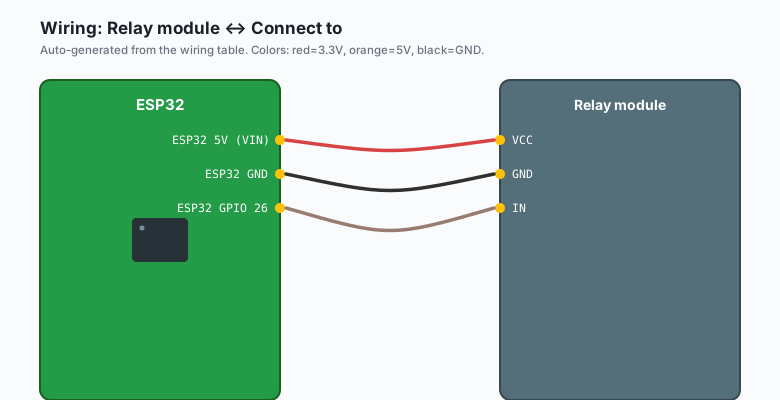
No wiring for auth itself. If you protect a physical output, the relay module wiring is:
| Relay module | Connect to |
|---|---|
VCC | ESP32 5V (VIN) |
GND | ESP32 GND |
| IN | ESP32 GPIO 26 |
Relay IN pins driven by 3.3 V logic work on most opto-isolated boards. If your relay chatters or never clicks, it is a 5 V-only input; use a transistor stage or a different board.
Install
Nothing new. WebServer is built into the ESP32 Arduino core, and
random tokens come from the hardware RNG through esp_random(), which
is part of the core. Arduino IDE >> Tools >> Board >> confirm your
ESP32 board is selected, then upload as usual.
The code
The full sketch: login form, three protected routes, session tokens with expiry, and a logout route. One user, four lines of config.
#include <WiFi.h>
#include <WebServer.h>
#include <esp_system.h>

const char* ssid     = "your-wifi-ssid";
const char* password = "your-wifi-password";

// One user. For a family, add users the same way (structs in an array).
const char* ADMIN_USER = "brian";
const char* ADMIN_PASS = "change-me-before-uploading";

WebServer server(80);

// ---- session store -------------------------------------------------
// The ESP32 cannot hold a database. It holds a few live tokens in RAM.
// Each token is a 32-bit random value; each has an expiry.
struct Session {
  uint32_t token;
  unsigned long expiresAt;
};

const int MAX_SESSIONS = 4;
Session sessions[MAX_SESSIONS];
const unsigned long SESSION_TTL_MS = 30UL * 60UL * 1000UL;  // 30 min

int findSession(uint32_t token) {
  if (token == 0) return -1;
  for (int i = 0; i < MAX_SESSIONS; i++) {
    if (sessions[i].token == token) {
      if (millis() < sessions[i].expiresAt) return i;
      sessions[i].token = 0;   // expired: evict
      return -1;
    }
  }
  return -1;
}

int newSession() {
  // Reuse a free slot, or the oldest one when the table is full
  int oldest = 0;
  for (int i = 0; i < MAX_SESSIONS; i++) {
    if (sessions[i].token == 0) return i;
    if (sessions[i].expiresAt < sessions[oldest].expiresAt) oldest = i;
  }
  return oldest;
}

// ---- auth helpers --------------------------------------------------
bool isAuthed() {
  if (!server.hasHeader("Cookie")) return false;
  String cookie = server.header("Cookie");
  int idx = cookie.indexOf("esp_session=");
  if (idx < 0) return false;
  uint32_t token = (uint32_t)strtoul(cookie.substring(idx + 12).c_str(), NULL, 16);
  return findSession(token) >= 0;
}

void requireAuth() {
  if (isAuthed()) return;
  // Send the login form instead of the protected page
  String html = "<!DOCTYPE html><html><head><meta charset='utf-8'>"
                "<title>Login</title></head>"
                "<body style='font-family:sans-serif;max-width:20rem;margin:4rem auto'>"
                "<h1>Dashboard login</h1>"
                "<form method='POST' action='/login'>"
                "<p><input name='u' placeholder='username'></p>"
                "<p><input name='p' type='password' placeholder='password'></p>"
                "<p><button type='submit'>Log in</button></p>"
                "</form></body></html>";
  server.send(401, "text/html", html);
}

void handleLogin() {
  String u = server.arg("u");
  String p = server.arg("p");
  if (u != ADMIN_USER || p != ADMIN_PASS) {
    server.send(403, "text/plain", "wrong username or password");
    return;
  }
  uint32_t token = esp_random();          // hardware RNG, never sequential
  int slot = newSession();
  sessions[slot].token = token;
  sessions[slot].expiresAt = millis() + SESSION_TTL_MS;
  // HttpOnly keeps the token away from page JavaScript
  server.sendHeader("Set-Cookie",
    "esp_session=" + String((unsigned long)token, 16) +
    "; HttpOnly; Path=/; Max-Age=1800");
  server.sendHeader("Location", "/");
  server.send(303);
}

void handleLogout() {
  if (server.hasHeader("Cookie")) {
    String cookie = server.header("Cookie");
    int idx = cookie.indexOf("esp_session=");
    if (idx >= 0) {
      uint32_t token = (uint32_t)strtoul(cookie.substring(idx + 12).c_str(), NULL, 16);
      int slot = findSession(token);
      if (slot >= 0) sessions[slot].token = 0;
    }
  }
  server.sendHeader("Set-Cookie", "esp_session=; Path=/; Max-Age=0");
  server.sendHeader("Location", "/login-page");
  server.send(303);
}

void handleLoginPage() {
  // Same form as requireAuth() sends; separate route for a clean /logout flow
  String html = "<!DOCTYPE html><html><body>"
                "<form method='POST' action='/login'>"
                "<input name='u'><input name='p' type='password'>"
                "<button>Log in</button></form></body></html>";
  server.send(200, "text/html", html);
}

void handleRoot() {
  if (!isAuthed()) { requireAuth(); return; }
  server.send(200, "text/html",
    "<h1>Protected dashboard</h1>"
    "<p>Sensor readings go here.</p>"
    "<p><a href='/logout'>Log out</a></p>");
}

void handleRelay() {
  if (!isAuthed()) { requireAuth(); return; }
  // digitalWrite(RELAY_PIN, HIGH) or whatever the protected action is
  server.send(200, "text/plain", "relay toggled");
}

void setup() {
  Serial.begin(115200);
  for (int i = 0; i < MAX_SESSIONS; i++) sessions[i].token = 0;

  WiFi.mode(WIFI_STA);
  WiFi.begin(ssid, password);
  while (WiFi.status() != WL_CONNECTED) delay(500);
  Serial.print("IP: ");
  Serial.println(WiFi.localIP());

  // WebServer must be told to capture the Cookie header
  const char* headers[] = { "Cookie" };
  server.collectHeaders(headers, 1);

  server.on("/", handleRoot);
  server.on("/relay", handleRelay);
  server.on("/login", HTTP_POST, handleLogin);
  server.on("/login-page", handleLoginPage);
  server.on("/logout", handleLogout);
  server.onNotFound([]() {
    if (!isAuthed()) { requireAuth(); return; }
    server.send(404, "text/plain", "not found");
  });
  server.begin();
}

void loop() {
  server.handleClient();
}
Four details carry the whole scheme:
esp_random()tokens. A token an attacker can guess is a password they do not need. The hardware RNG makes the tokens unpredictable, and evicting the oldest session caps the table at four.HttpOnlyon the cookie. Without it, any XSS bug in a page you serve hands the session token to JavaScript.- One enforcement point.
requireAuth()runs at the top of every protected handler and inonNotFound. New routes inherit the check by habit, not memory. - Expiry. Tokens die after 30 minutes. Without expiry, the token you emailed yourself from the office fridge laptop is a permanent key.
The honest limits
This scheme protects against a houseguest or a curious neighbor on the same Wi-Fi. It does not protect against:
- An attacker who can read your packets. The password crosses the wire in a plain POST body. HTTP Basic auth is worse (it re-sends the password base64-encoded on every request); session cookies at least send the token, not the credential. Either way: LAN only.
- Brute force. There is no rate limiting or lockout. The 403 reply
comes as fast as requests arrive (e.g. a script hammering
/loginwill try thousands of passwords a second on your network). A dedicated attacker inside your LAN has better options anyway; the realistic threat here is curiosity, and this stops it. - Multiple users with separation. This is one user with a shared password. Fine for a household, not fine for anything with roles.
If you need real security on the open internet, terminate TLS at a reverse proxy on a Raspberry Pi and keep the ESP32 behind it.
What you learned
- Auth is a session store plus one enforcement point, not per-route checks scattered across handlers.
- Session tokens should come from
esp_random(), live in RAM with an expiry, and ride in anHttpOnlycookie. WebServerneedsserver.collectHeaders()before it shows you the Cookie header at all.- The right scope for this scheme: a LAN you control. Internet-facing devices want a reverse proxy with TLS in front, or nothing exposed.
- Logout deletes the token server-side and clears the cookie client-side; both halves matter.
When something breaks
- Login succeeds but the dashboard still asks for credentials. The
Cookie header is not being captured. You skipped
server.collectHeaders(headers, 1)in setup, soisAuthed()never sees the token. Add it and re-upload. - Works in the browser, curl gets 401. curl does not store or
resend cookies by default. Use
curl -c jar.txt -d "u=brian&p=secret" http://ip/loginthencurl -b jar.txt http://ip/(e.g. the cookie jar pattern from any HTTP debugging session). - Everyone logs out when another device logs in. Your session
table is size 1 or you are reusing slot 0 every time. The
newSession()function above keeps four slots and evicts only the oldest expired one. - Session dies long before 30 minutes.
millis()wraps at about 49 days, and a token created withmillis() + TTLjust before the wrap fails themillis() < expiresAtcheck early. If your device will truly run that long, store expiry as a remaining-lifetime counter and compare with subtraction. - The password is in the source, and you committed it. Welcome to the honest problem with hard-coded credentials. Rotate the password, and keep the real one out of version control (e.g. a template sketch in git plus the live credentials only on the device).
What to build next
- The HTTP server in depth tutorial shows the routing and JSON API this auth layer drops onto; protect every route it registers.
- The mDNS tutorial gives the protected dashboard a name
(
garage.local) so nobody memorizes IP addresses. - The ntfy notifications tutorial replaces one whole class of protected pages: instead of logging into a dashboard to check status, the chip pushes the status to you.
- The TLS in depth tutorial is the serious sibling of this one for anything that leaves your LAN.