ESP32: build a solar-powered trail camera
ESP32-CAM with PIR motion sensor, SD card storage, and solar power. Captures images when motion is detected and stores them on the SD card.
A trail camera: ESP32-CAM takes a photo when the PIR motion sensor fires, saves to SD card, and goes back to sleep. Solar + battery means it runs indefinitely in the field.
This is the project that ties the camera (built-in to ESP32-CAM), PIR motion, SD card, deep sleep, and solar+battery tutorials together.
What you need
- ESP32-CAM module (about $10)
- PIR motion sensor (HC-SR501)
- microSD card (8-32 GB)
- microSD card adapter for the ESP32-CAM (usually ships with the board)
- 18650 + TP4056 + LDO (from the battery tutorial)
- Small solar panel (1-2W, 6V)
- Schottky diode (1N5817)
- Weatherproof enclosure (IP65 or better)
- FTDI USB-serial adapter (for programming the ESP32-CAM; it has no USB)
Wiring
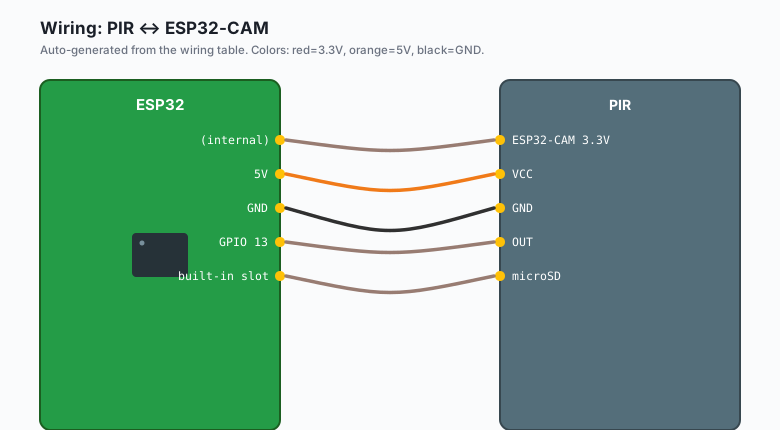
ESP32-CAM 5V -- TP4056 OUT+ (via diode from solar panel)
ESP32-CAM GND -- TP4056 OUT- (common ground)
ESP32-CAM 3.3V -- (internal)

PIR VCC -- ESP32-CAM 5V
PIR GND -- ESP32-CAM GND
PIR OUT -- ESP32-CAM GPIO 13

microSD -- ESP32-CAM built-in slot
The ESP32-CAM has built-in microSD support. Insert a card formatted as FAT32.
Programming the ESP32-CAM
The ESP32-CAM does not have a USB port. You need an FTDI adapter:
FTDI 5V  -- ESP32-CAM 5V
FTDI GND -- ESP32-CAM GND
FTDI TX  -- ESP32-CAM RX (GPIO 3)
FTDI RX  -- ESP32-CAM TX (GPIO 1)
Set the FTDI to 3.3V mode. Connect GPIO 0 to GND during power-up to enter download mode. After upload, disconnect GPIO 0 from GND.
The code
#include "esp_camera.h"
#include "SD_MMC.h"
#include "esp_sleep.h"

// ESP32-CAM pin definitions (AI-Thinker model)
#define PWDN_GPIO_NUM     32
#define RESET_GPIO_NUM    -1
#define XCLK_GPIO_NUM      0
#define SIOD_GPIO_NUM     26
#define SIOC_GPIO_NUM     27
#define Y9_GPIO_NUM       35
#define Y8_GPIO_NUM       34
#define Y7_GPIO_NUM       39
#define Y6_GPIO_NUM       36
#define Y5_GPIO_NUM       21
#define Y4_GPIO_NUM       19
#define Y3_GPIO_NUM       18
#define Y2_GPIO_NUM        5
#define VSYNC_GPIO_NUM    25
#define HREF_GPIO_NUM     23
#define PCLK_GPIO_NUM     22

#define PIR_PIN 13

void setup() {
  Serial.begin(115200);
  delay(1000);

  pinMode(PIR_PIN, INPUT);

  // Initialize camera
  camera_config_t config;
  config.ledc_channel = LEDC_CHANNEL_0;
  config.ledc_timer = LEDC_TIMER_0;
  config.pin_d0 = Y2_GPIO_NUM;
  config.pin_d1 = Y3_GPIO_NUM;
  config.pin_d2 = Y4_GPIO_NUM;
  config.pin_d3 = Y5_GPIO_NUM;
  config.pin_d4 = Y6_GPIO_NUM;
  config.pin_d5 = Y7_GPIO_NUM;
  config.pin_d6 = Y8_GPIO_NUM;
  config.pin_d7 = Y9_GPIO_NUM;
  config.pin_xclk = XCLK_GPIO_NUM;
  config.pin_pclk = PCLK_GPIO_NUM;
  config.pin_vsync = VSYNC_GPIO_NUM;
  config.pin_href = HREF_GPIO_NUM;
  config.pin_sccb_sda = SIOD_GPIO_NUM;
  config.pin_sccb_scl = SIOC_GPIO_NUM;
  config.pin_pwdn = PWDN_GPIO_NUM;
  config.pin_reset = RESET_GPIO_NUM;
  config.xclk_freq_hz = 20000000;
  config.pixel_format = PIXFORMAT_JPEG;
  config.frame_size = FRAMESIZE_UXGA;   // 1600x1200
  config.jpeg_quality = 10;
  config.fb_count = 1;

  esp_err_t err = esp_camera_init(&config);
  if (err != ESP_OK) {
    Serial.printf("Camera init failed: 0x%x\n", err);
    ESP.restart();
  }

  // Initialize SD card
  if (!SD_MMC.begin()) {
    Serial.println("SD card init failed");
    ESP.restart();
  }

  Serial.println("Trail camera ready");
  Serial.println("Press the BOOT button to take a test photo");
}

void loop() {
  if (digitalRead(PIR_PIN) == HIGH) {
    Serial.println("Motion detected, capturing");
    takePhoto();
    delay(2000);   // debounce
  }

  // Sleep for 30 seconds if no motion
  esp_sleep_enable_ext0_wakeup(PIR_PIN, 1);
  esp_sleep_enable_timer_wakeup(30 * 1000000ULL);
  esp_deep_sleep_start();
}

void takePhoto() {
  camera_fb_t *fb = esp_camera_fb_get();
  if (!fb) {
    Serial.println("Camera capture failed");
    return;
  }

  // Generate filename: /sdcard/IMG_001.jpg
  static int photoCount = 0;
  photoCount++;
  char filename[32];
  snprintf(filename, sizeof(filename), "/sdcard/IMG_%03d.jpg", photoCount);

  File file = SD_MMC.open(filename, FILE_WRITE);
  if (!file) {
    Serial.printf("Failed to open %s\n", filename);
    esp_camera_fb_return(fb);
    return;
  }
  file.write(fb->buf, fb->len);
  file.close();
  esp_camera_fb_return(fb);

  Serial.printf("Saved %s (%d bytes)\n", filename, fb->len);
}
Upload. Press the BOOT button (or trigger the PIR). The ESP32-CAM
takes a photo, saves it as IMG_001.jpg on the SD card, and goes back
to sleep.
The SD card capacity
A 32 GB SD card holds about 20,000 JPEG photos at UXGA resolution (1600x1200). At 1 photo per hour (or per motion event), that is about 2 years of storage.
For higher resolution, use the OV2640’s full 5MP mode (FRAMESIZE_QSXGA). File size per photo doubles.
The battery math
The ESP32-CAM takes about 1 second to wake, capture, save, and sleep. During that 1 second, it draws about 200 mA. At rest, it draws about 20 mA in deep sleep.
For 10 photos per day:
- Wake time: 10 * 1 = 10 seconds at 200 mA = 0.6 mAh
- Sleep time: 86390 seconds at 20 mA = 480 mAh
Wait, that’s wrong. 20 mA in deep sleep is way too high. Let me redo the math:
- Wake time: 10 * 1 second = 10 seconds. 200 mA peak.
- Sleep time: 86390 seconds at 0.5 mA (ESP32-CAM deep sleep with PIR active).
Per day: (10 * 200 / 3600) + (86390 * 0.5 / 3600) = 0.55 + 12 = 12.5 mAh.
A 2500 mAh 18650 lasts about 200 days without solar. A 1W solar panel in 4 sun-hours provides 200 mAh per day, which is enough.
The weatherproof enclosure
The ESP32-CAM and PIR need weather protection:
- IP65 or IP67 enclosure (the kind for outdoor electrical boxes)
- Camera lens opening (use a clear window or the lens through a hole)
- PIR sensor exposed (use a waterproof PIR with a clear lens cover)
- Cable glands for any external wires
A standard outdoor junction box with a clear lid works. Mount the camera with the lens through a hole in the box, sealed with silicone.
What you learned
- A complete solar-powered trail camera.
- ESP32-CAM with camera, PIR, SD card, and deep sleep.
- Solar + battery for perpetual operation.
- 200+ days runtime on a single 18650 with solar.
What to build next
- The PIR motion tutorial covers the sensor.
- The 18650 + TP4056 tutorial covers the battery.
- The solar + battery tutorial covers the perpetual power.
- The book ESP32 Camera Projects covers image processing, motion detection in software, and remote viewing.