ESP32: detect motion with a PIR motion sensor
Wire a PIR motion sensor (HC-SR501) to an ESP32 and detect people moving in a room. The foundation for security, automation, and wake-on-motion projects.
The PIR motion sensor (HC-SR501 is the most common module) is the cheapest way to detect that someone is in a room. It is a $1 sensor that outputs HIGH when it detects motion and LOW otherwise. Wire it to a GPIO, and you have a motion detector that runs for years on a small battery.
The sensor itself is a passive infrared detector behind a fresnel lens. It detects the change in infrared radiation when a warm body moves across its field of view. It is sensitive to people and large animals; not sensitive to static objects.
This tutorial covers wiring, the two adjustment pots, the warm-up time, and the project patterns (security, automation, wake-on-motion).
What you need
- ESP32 dev board
- HC-SR501 PIR motion sensor module (about $1 from anywhere; the variants with three pins labelled VCC, OUT, GND)
- 3 jumper wires
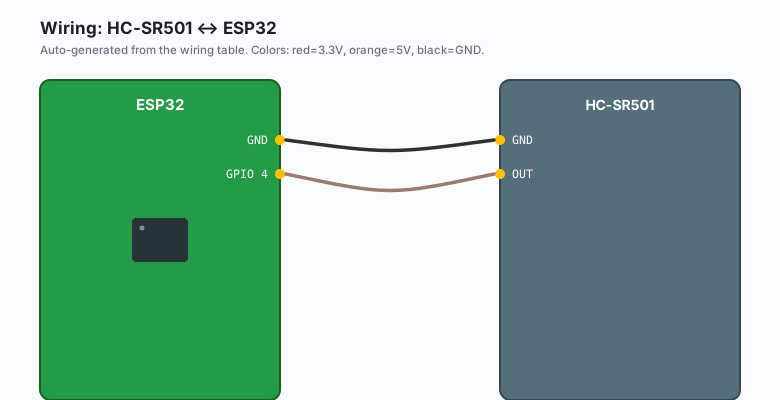
Wiring
HC-SR501 VCC -- ESP32 5V (the module needs 5V; 3.3V may not work)
HC-SR501 GND -- ESP32 GND
HC-SR501 OUT -- ESP32 GPIO 4
The HC-SR501 runs on 4.5-20V, so the ESP32’s 5V pin works. The output is 3.3V-compatible HIGH/LOW despite running on 5V.
If you must use 3.3V (e.g. running from battery), some HC-SR501 clones work on 3.3V. The original ones do not. Test with your specific module.
The two adjustment pots
The HC-SR501 has two potentiometers on the back:
| Pot | Adjustment | Effect |
|---|---|---|
| Sx (left, looking at the back) | Sensitivity | Range of detection, 3-7 meters |
| Tx (right) | Time delay | How long OUT stays HIGH after a trigger, 5 sec to 5 min |
Turning the sensitivity pot clockwise increases the range. Turning the time-delay pot clockwise increases how long the output stays HIGH after a trigger.
For most projects, sensitivity maxed out (clockwise) and time delay short (counterclockwise to 5 seconds) is the right starting point.
The “time delay” setting is not a re-trigger delay. It is the minimum time OUT stays HIGH after a single trigger. After the delay, OUT goes LOW and the sensor waits for the next trigger. If you want a longer trigger window, set this higher.
The warm-up time
The HC-SR501 needs about 30-60 seconds to stabilize after power-up. During this time, OUT may randomly go HIGH and LOW. Ignore the readings during warm-up:
void setup() {
  Serial.begin(115200);
  delay(1000);
  pinMode(PIR_PIN, INPUT);
  Serial.println("PIR warming up, ignoring motion for 60 seconds...");
  delay(60000);   // wait for the sensor to stabilize
  Serial.println("PIR ready.");
}
If you do not wait, your project will fire false alarms on startup.
The code
ESP32 (Arduino)
const int PIR_PIN = 4;

unsigned long lastTrigger = 0;
bool motionActive = false;
const unsigned long MOTION_TIMEOUT = 10000;

void setup() {
  Serial.begin(115200);
  delay(1000);
  pinMode(PIR_PIN, INPUT);
  Serial.println("PIR warming up, wait 60s...");
  delay(60000);
  Serial.println("PIR ready.");
}

void loop() {
  bool reading = digitalRead(PIR_PIN);
  if (reading) {
    lastTrigger = millis();
    if (!motionActive) {
      Serial.println("Motion START");
      motionActive = true;
    }
  } else {
    if (motionActive && (millis() - lastTrigger > MOTION_TIMEOUT)) {
      Serial.println("Motion END");
      motionActive = false;
    }
  }
  delay(50);
}
Arduino (Uno, Nano, Mega)
const int PIR_PIN = 2;   // any digital pin works

unsigned long lastTrigger = 0;
bool motionActive = false;
const unsigned long MOTION_TIMEOUT = 10000;

void setup() {
  Serial.begin(9600);   // 9600 is more reliable than 115200 on the Uno's USB bridge
  delay(1000);
  pinMode(PIR_PIN, INPUT);
  Serial.println("PIR warming up, wait 60s...");
  delay(60000);
  Serial.println("PIR ready.");
}

void loop() {
  bool reading = digitalRead(PIR_PIN);
  if (reading) {
    lastTrigger = millis();
    if (!motionActive) {
      Serial.println("Motion START");
      motionActive = true;
    }
  } else {
    if (motionActive && (millis() - lastTrigger > MOTION_TIMEOUT)) {
      Serial.println("Motion END");
      motionActive = false;
    }
  }
  delay(50);
}
The Uno’s ATmega328 has no ADC2-vs-Wi-Fi trap, so any GPIO pin works.
MicroPython (ESP32 or Pico)
from machine import Pin
import time

PIR_PIN = 4
pir = Pin(PIR_PIN, Pin.IN)
motion_active = False
last_trigger = 0
TIMEOUT_MS = 10_000

print('PIR warming up, wait 60s...')
time.sleep_ms(60_000)
print('PIR ready.')

while True:
    reading = pir.value()
    now = time.ticks_ms()
    if reading:
        last_trigger = now
        if not motion_active:
            print('Motion START')
            motion_active = True
    else:
        if motion_active and (time.ticks_diff(now, last_trigger) > TIMEOUT_MS):
            print('Motion END')
            motion_active = False
    time.sleep_ms(50)
Raspberry Pi Python (with gpiozero)
import gpiozero
import time

pir = gpiozero.MotionSensor(4)   # BCM pin 4 (physical pin 7)
print('PIR warming up, wait 60s...')
time.sleep(60)
print('PIR ready.')

pir.when_motion = lambda: print('Motion START')
pir.when_no_motion = lambda: print('Motion END')

while True:
    time.sleep(1)
gpiozero.MotionSensordoes the warm-up, debouncing, and event handling for you. Thewhen_motionandwhen_no_motioncallbacks fire automatically.
What you should see
The 10-second timeout is a tradeoff. The HC-SR501’s OUT stays HIGH for the time-delay setting (5 sec by default), so we set our timeout higher than that. Adjust based on your time-delay setting.
The retrigger jumper
The HC-SR501 has a 3-pin jumper on the back labeled H and L. The default is H (single trigger mode). In single trigger mode, the OUT goes HIGH once, then ignores new triggers until the time delay expires. In L (repeatable trigger mode), every motion event resets the time delay, keeping OUT HIGH as long as motion continues.
For most projects, H is fine. For “motion just ended” detection, you need L mode and a longer time delay.
Project patterns
Security alarm
Trigger a buzzer or send an MQTT alert when motion is detected while the system is armed:
bool armed = false;

void loop() {
  if (motionActive && armed) {
    mqtt.publish("ctrlaltbrian/security/motion", "ALARM");
    digitalWrite(BUZZER_PIN, HIGH);
    delay(1000);
    digitalWrite(BUZZER_PIN, LOW);
  }
}
Wake-on-motion for battery projects
The PIR can wake the ESP32 from deep sleep. Wire the OUT pin to a GPIO
that supports esp_sleep_enable_ext0_wakeup() (any GPIO except 6-11):
#define BUTTON_PIN_BITMASK (1ULL << PIR_PIN)

void setup() {
  esp_sleep_enable_ext0_wakeup(PIR_PIN, 1);   // wake when PIR goes HIGH
  // ...
  esp_deep_sleep_start();
}
When the ESP32 wakes from deep sleep, it knows motion happened. Read the PIR, take action, go back to sleep. Battery life is measured in months.
Lighting automation
Turn on a relay or smart bulb when someone enters a room:
void loop() {
  if (motionActive) {
    digitalWrite(LIGHT_PIN, HIGH);
  } else if (!motionActive && (millis() - lastTrigger > 60000)) {
    digitalWrite(LIGHT_PIN, LOW);
  }
}
The 60-second “no motion” timeout is the right delay for a room. If the person is reading, they need the light to stay on.
What you learned
- The HC-SR501 PIR sensor detects motion of warm bodies via a fresnel lens.
- Wiring is 3 pins: VCC (5V), GND, OUT.
- Wait 60 seconds after power-up for the sensor to stabilize.
- Two adjustment pots control sensitivity (range) and time delay (how long OUT stays HIGH).
When something breaks
- False triggers constantly. Sensitivity too high, or sensor is pointed at a window (sunlight), a heating vent, or a busy area.
- No triggers at all. Wiring wrong, or the warm-up period is not over. Check the OUT pin with a multimeter; it should toggle between 0V and 3.3V when motion happens.
- Sensor triggers when nothing is moving. Sensitivity too high, or a draft is moving a curtain. Reposition or reduce sensitivity.
- OUT stays HIGH forever. Time delay is set too high, or the sensor is in single-trigger mode and a person is constantly moving.
What to build next
- The HC-SR04 tutorial adds distance sensing to a PIR for projects that need to know if someone is close, not just present.
- The deep sleep + PIR wake tutorial covers the wake-on-motion battery pattern in depth.
- The book ESP32 Smart Home covers building a complete home security system with multiple PIR sensors and a dashboard.