ESP32: play audio through the MAX98357A I2S amp
Wire the MAX98357A I2S amplifier to an ESP32 and play WAV data from flash or an internet stream. The talking-device pattern that pairs with the INMP441 microphone tutorial.
You have an ESP32 listening with an INMP441 (the I2S microphone tutorial covers the input half). This is the output half: the MAX98357A, a 3-wire-in 3-watt-out class-D amplifier that speaks I2S, the same bus the mic uses. Wire it to a small speaker and the ESP32 can talk: play beeps, spoken prompts, or the “door opened” chime that makes a project feel finished.
The trap: people wire it up, run a test sketch, and hear noise or silence, then spend an evening blaming the code. It is almost never the code. It is the gain pin (floating gain is 9 dB, which clips a quiet signal into garbage), the speaker impedance (4 or 8 ohm, not a headphone), or Wi-Fi traffic colliding with the I2S clock. Check the three hardware things first.
What you need
Needed
| Part | Qty | Why this one |
|---|---|---|
| ESP32 dev board | 1 | The I2S peripheral is built in; no extra DAC needed |
| MAX98357A breakout (Adafruit 3006 or the blue GY variant) | 1 | I2S in, 3 W class-D out, works at 5 V with 3.3 V-tolerant inputs |
| 4 or 8 ohm speaker, 3 W max | 1 | The amp is rated 3 W; a beefier speaker just distorts |
| Jumper wires | 6 | I2S three lines, power two |
Nice to have
- Soldering iron and solder (if the breakout’s headers are loose)
- Iron stand and soldering mat
- Helping hands (holding a header while soldering)
- Wire stripper (for bare-wire speaker connections)
- Multimeter (verify 5 V actually reaches Vin before blaming the amp)
- Anti-static wristband
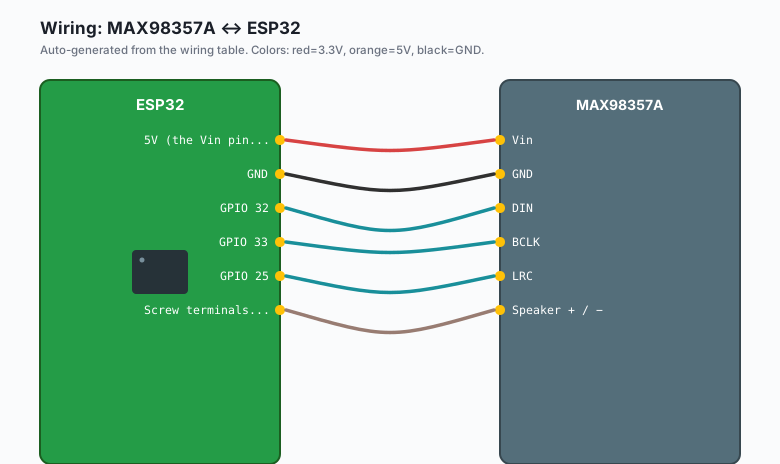
Wiring
| MAX98357A | ESP32 |
|---|---|
Vin | 5V (the Vin pin) |
GND | GND |
DIN | GPIO 32 |
| BCLK | GPIO 33 |
| LRC | GPIO 25 |
| Speaker + / − | Screw terminals to a 4 or 8 ohm speaker |
The INMP441 mic tutorial used GPIO 32/33/25 for input. For output on a second I2S peripheral, pick different pins (e.g. SCK 26, WS 27, SD 35 for the mic while the amp keeps 32/33/25). One I2S peripheral cannot be input and output at the same time, but the ESP32 has two peripherals, so mic and amp coexist fine.
The GAIN pin sets amp gain: tied to GND is 12 dB, floating is 9 dB, tied to Vin is 6 dB, and a 100k resistor from GAIN to Vin gives 15 dB. Floating is fine for testing. If audio is loud-but-crunchy, drop the gain to 6 dB before you rewrite any code.
Install
In the Arduino IDE: Sketch >> Include Library >> Manage Libraries >> search ESP8266Audio by Earle Philhower. Install it.
Despite the name it supports the ESP32 and provides WAV and MP3
players that output to I2S. Nothing else to install; the I2S driver
ships with the ESP32 Arduino core.
The code
First the direct approach: a beep and a WAV blob from program memory. This is the talking-device pattern in its smallest form: the ESP32 holds a short sound in flash and pushes it out on cue.
#include <driver/i2s.h>
#include "sound.h"   // a WAV converted to a byte array (see below)

#define I2S_DIN   32
#define I2S_BCLK  33
#define I2S_LRC   25

void i2sInit() {
  i2s_config_t cfg = {
    .mode = (i2s_mode_t)(I2S_MODE_MASTER | I2S_MODE_TX),
    .sample_rate = 22050,
    .bits_per_sample = I2S_BITS_PER_SAMPLE_16BIT,
    .channel_format = I2S_CHANNEL_FMT_ONLY_LEFT,
    .communication_format = I2S_COMM_FORMAT_STAND_I2S,
    .intr_alloc_flags = ESP_INTR_FLAG_LEVEL1,
    .dma_buf_count = 8,
    .dma_buf_len = 256,
    .use_apll = false,
    .tx_desc_auto_clear = true,
  };
  i2s_pin_config_t pins = {
    .mck_io_num = I2S_PIN_NO_CHANGE,
    .bck_io_num = I2S_BCLK,
    .ws_io_num = I2S_LRC,
    .data_out_num = I2S_DIN,
    .data_in_num = I2S_PIN_NO_CHANGE,   // output only
  };
  i2s_driver_install(I2S_NUM_0, &cfg, 0, NULL);
  i2s_set_pin(I2S_NUM_0, &pins);
}

void playWav() {
  // Skip the 44-byte WAV header in the array
  const uint8_t* data = sound_data + 44;
  size_t bytes = sizeof(sound_data) - 44;
  size_t written;
  i2s_write(I2S_NUM_0, data, bytes, &written, portMAX_DELAY);
}

void beep(uint32_t freq, uint32_t ms) {
  const int rate = 22050;
  int16_t sample;
  for (uint32_t i = 0; i < (rate / 1000) * ms; i++) {
    sample = (int16_t)(8000.0 * sin(2.0 * PI * freq * i / rate));
    i2s_write(I2S_NUM_0, &sample, 2, nullptr, portMAX_DELAY);
  }
}

void setup() {
  Serial.begin(115200);
  i2sInit();
  Serial.println("Beep in 1 second...");
  delay(1000);
  beep(880, 300);
  delay(500);
  playWav();          // your sound: a chime, a voice line, whatever
  Serial.println("Done.");
}

void loop() {}
To make sound.h: take a small mono 16-bit 22050 Hz WAV (Audacity
does the conversion), then run:
xxd -i chime.wav > sound.hxxd -i emits the array plus a length symbol; either rename them to
match the sketch or adjust the sketch to the generated names.
The streaming version
For anything longer than a beep you do not want the audio in flash. ESP8266Audio plays an MP3 stream straight out through the same three wires:
#include <WiFi.h>
#include "AudioFileSourceHTTPStream.h"
#include "AudioGeneratorMP3.h"
#include "AudioOutputI2S.h"

AudioGeneratorMP3* mp3;
AudioFileSourceHTTPStream* file;
AudioOutputI2S* out;

void setup() {
  Serial.begin(115200);
  WiFi.begin("your-wifi-ssid", "your-wifi-password");
  while (WiFi.status() != WL_CONNECTED) delay(300);

  file = new AudioFileSourceHTTPStream("http://your-server:8000/stream");
  out = new AudioOutputI2S();
  out->SetPinout(33, 25, 32);   // BCLK, LRC, DIN
  out->SetGain(0.5);            // 0.0 to 1.0; start low, your ears matter
  mp3 = new AudioGeneratorMP3();
  mp3->begin(file, out);
}

void loop() {
  if (mp3->isRunning()) {
    if (!mp3->loop()) {
      mp3->stop();
      Serial.println("Stream ended.");
    }
  }
}
That is the whole player: a URL in, sound out. Point it at your own stream (e.g. a self-hosted Icecast server or an MP3 served by the web server tutorial) and you have a talking device that never touches a cloud service.
What you learned
- The MAX98357A takes standard I2S and amplifies it to speaker level; the ESP32 generates I2S with its built-in peripheral.
- Output is the same driver pattern as input, with I2S_MODE_TX and a data_out pin instead of data_in.
- Short sounds live in flash as byte arrays (xxd -i converts a WAV to C); long audio streams over HTTP.
- Gain pin floating is 9 dB; drop to 6 dB if it clips.
When something breaks
- Silence. Check in order: 5 V on Vin, speaker actually connected, DIN/BCLK/LRC on the pins the code says. Then check GAIN: a stray jumper tying it to GND is 12 dB into a tiny speaker, which distorts into a buzz that reads as broken.
- Loud static or robotic noise. Sample rate mismatch. The WAV was recorded at 22050 and the driver runs at 44100 (or the reverse). These must match the WAV header exactly.
- Plays fine, then stutters when Wi-Fi is busy. DMA buffers too
small for the network load. Bump
dma_buf_countto 16 or lower the stream bitrate. This is the classic I2S-plus-Wi-Fi collision. - MP3 plays nothing but the beep works. The stream URL returns an error page, not audio. Test the URL in a browser first; MP3 decoders fail silent on HTML.
- Mic and amp both wired, neither works. You pointed both at the same I2S peripheral (the INMP441 sketch uses I2S_NUM_0 too). Give the amp I2S_NUM_1 with different GPIOs, or unplug the mic while you test.
What to build next
- Pair this with the INMP441 microphone tutorial and you have a walkie-talkie: mic pushes audio over the network, amp plays it.
- The wake word detection tutorial plus this amp is a self-hosted doorbell that greets by name.
- Add ntfy notifications with a spoken alert instead of a phone buzz (e.g. play a chime through the amp, then push the details to the phone).
- The book IoT with ESP32 bundles the mic, amp, and streaming into one door-station project arc.