ESP32: drive a low-power e-paper display
Drive a 2.9-inch e-ink panel with an ESP32: crisp static text, months on a battery, and the refresh rules that keep the panel alive.
E-paper (e-ink) is the display that keeps its picture with the power off. It is slow (2-4 seconds per refresh), it is black and white (or black/white/red), and it is perfect for exactly one category of project: something that shows data that changes rarely and must be readable in daylight without a backlight (e.g. a thermostat, a plant tag, a workshop stock list, a shelf label).
This tutorial drives a 2.9-inch panel from an ESP32 and explains the battery math that makes e-paper + deep sleep + Wi-Fi the longest-lived DIY display there is.
What you need
- ESP32 dev board
- 2.9-inch e-paper module, 296x128, SPI (the Waveshare one is the reference; good clone panels work with the same driver, about $12)
- Jumper wires
- (For the battery build) a 18650 + TP4056 from the power tutorial
Why e-paper over an OLED for this job: the OLED draws current every second it shows anything. E-paper draws current only while changing. A weather tag that updates once an hour runs a year on one cell with e-paper and about a week on an OLED (e.g. this is the same math that puts e-ink in every hotel door sign).
Wiring (SPI)
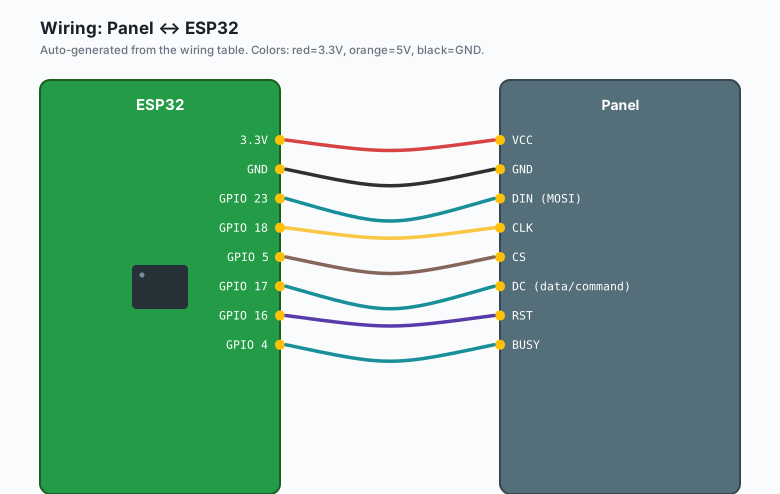
| Panel | ESP32 |
|---|---|
VCC | 3.3V |
GND | GND |
DIN (MOSI) | GPIO 23 |
CLK | GPIO 18 |
CS | GPIO 5 |
DC (data/command) | GPIO 17 |
RST | GPIO 16 |
| BUSY | GPIO 4 |
The BUSY line is the one people leave unconnected and then wonder why the panel misbehaves: the driver waits for it between commands. It is required.
Install
Arduino IDE >> Sketch >> Include Library >> Manage Libraries, search “GxEPD2”, install it (by Jean-Marc Zingg). It supports every panel you will realistically buy, including the 2.9-inch B/W and the tri-color variants.
The code
#include <GxEPD2_BW.h>

// GxEPD2 driver class per panel; 2.9" 296x128 is this one:
GxEPD2_BW<GxEPD2_290_T94_6> display(GxEPD2_290_T94_6(/*CS*/5, /*DC*/17, /*RST*/16, /*BUSY*/4));

void setup() {
  Serial.begin(115200);
  display.init();
  display.setRotation(1);
  showPage("hello e-paper", "refreshed once");
  // deep sleep demo happens below; display.sleep() first
  display.hibernate();
  esp_deep_sleep(3600 * 1000000ULL);   // 1 hour
}

void showPage(const char* big, const char* small) {
  display.setFullWindow();
  display.firstPage();
  do {
    display.fillScreen(GxEPD_WHITE);
    display.setTextColor(GxEPD_BLACK);
    display.setFont(&FreeMonoBold12pt7b);
    display.setCursor(10, 40);
    display.print(big);
    display.setCursor(10, 80);
    display.setFont(&FreeMono9pt7b);
    display.print(small);
  } while (display.nextPage());
}
Upload once and the text stays on the panel forever (through power removal). The deep sleep wakes once an hour, redraws, sleeps again.
The refresh discipline
E-paper panels die young when abused. The rules:
- Full refresh, not partial, most of the time. Partial refresh is fast but leaves ghosting that accumulates. A full (flashing) refresh every N updates cleans the panel.
- Do not refresh in a tight loop. Every refresh is a small mechanical act (particles physically move). Refreshing every second wears the panel in weeks. Once per minute is a sane floor.
- Never drive it while sleeping.
display.hibernate()powers down the panel drivers; call it before deep sleep. - Update on real changes. If the temperature has not changed, skip the refresh (e.g. compare the new payload to the last drawn one and draw only on difference).
The battery math
One 18650 (2500 mAh), one refresh per hour:
| Phase | Current | Time | Charge per hour |
|---|---|---|---|
| Wake + Wi-Fi sync | 100 mA | 3 s | 0.08 mAh |
| Refresh | 15 mA peak | 3 s | 0.01 mAh |
| Deep sleep | 0.01 mA | rest | 0.35 mAh |
Total about 0.45 mAh per hour, 11 mAh per day. The 18650 carries the project 200+ days, and a 1W solar panel covers it indefinitely. This is the math that makes e-paper the only display worth considering for a wall-mounted, outlet-free build.
What you learned
- E-paper holds its image with zero power; the win is rare-refresh, always-readable projects.
- GxEPD2 handles the driver jungle; wiring includes the BUSY line.
- Refresh discipline (full cleans, minutes between, sleep between) is what keeps the panel alive for years.
When something breaks
- Nothing displays: BUSY unconnected, or wrong driver class. The GxEPD2 constructor must match your exact panel; the examples list every supported one (e.g. pick by size and color: BW vs 3-color classes differ).
- Ghosting after weeks: you have been partial-refreshing. Do a full refresh (setFullWindow) and the ghosts clear; schedule one full refresh per day.
- Image flips or shears: rotation and buffer geometry. Set setRotation() before drawing and redraw a full window to resync.
- Works on USB, dies on battery: you forgot display.hibernate() before deep sleep, so the panel driver drains the cell (e.g. 1 mA sounds small, 24 mA-days adds up).
What to build next
- The 18650 + TP4056 tutorial is the power side of the battery build.
- The weather station project has the data; swap its OLED for this panel for the wall version.
- Pair with MQTT: subscribe on wake, draw the latest state, sleep.