Arduino: Simon-says memory game
Build the Simon memory game with 4 buttons, 4 LEDs, and a buzzer. State machines, tone(), and the game loop that scales to any difficulty.
The Simon game is four buttons, four LEDs, one buzzer, and a growing sequence the player must repeat. It is the project I hand people who have blinked an LED and want to build something that feels like a real product (e.g. it has input handling, game states, and a win/lose path), and it fits on one Uno.
This version uses tone() for musical notes, INPUT_PULLUP buttons, and a state machine clean enough to extend.
What you need
- Arduino Uno
- 4x LEDs (any four colors) + 4x 220 ohm resistors
- 4x momentary pushbuttons (the tactile 6mm ones)
- A piezo buzzer (passive, not the “just add 5V” active kind; passive is what tone() drives)
- Breadboard and wires
Wiring
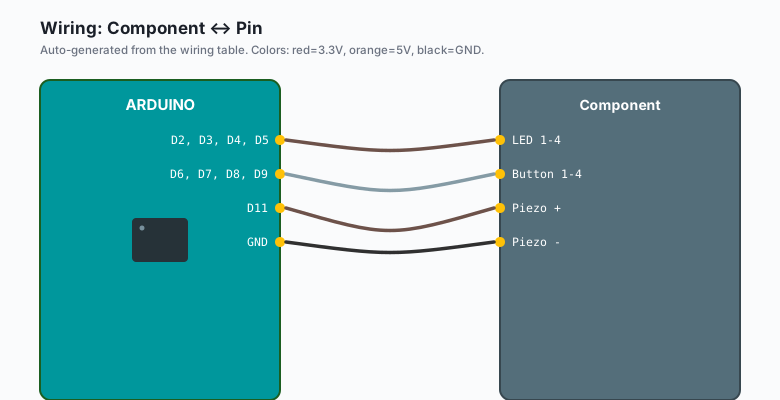
| Component | Pin |
|---|---|
| LED 1-4 | D2, D3, D4, D5 |
| Button 1-4 | D6, D7, D8, D9 |
| Piezo + | D11 |
| Piezo - | GND |
LEDs through their 220-ohm resistors to GND. Buttons use the internal pull-ups (wired pin-to-GND, pressed = LOW).
The code
const int LEDS[4]  = {2, 3, 4, 5};
const int BUTTONS[4] = {6, 7, 8, 9};
const int PIEZO = 11;
const int NOTES[4] = {262, 330, 392, 523};   // C, E, G, C (the real Simon notes)

int sequence[100];
int seqLen = 0;
const int MAX_LEN = 100;

void setup() {
  for (int i = 0; i < 4; i++) {
    pinMode(LEDS[i], OUTPUT);
    pinMode(BUTTONS[i], INPUT_PULLUP);
  }
  pinMode(PIEZO, OUTPUT);
  randomSeed(analogRead(A0));   // floating pin: real randomness
  Serial.begin(115200);
}

void playRound() {
  sequence[seqLen++] = random(0, 4);
  for (int i = 0; i < seqLen; i++) {
    show(sequence[i], 400);
  }
}

void show(int idx) {
  digitalWrite(LEDS[idx], HIGH);
  tone(PIEZO, NOTES[idx], 350);
  delay(400);
  digitalWrite(LEDS[idx], LOW);
  delay(150);
}

bool getPlayerInput() {
  for (int i = 0; i < seqLen; i++) {
    int pressed = waitForButton();
    digitalWrite(LEDS[pressed], HIGH);
    tone(PIEZO, NOTES[pressed], 350);
    delay(250);
    digitalWrite(LEDS[pressed], LOW);
    if (pressed != sequence[i]) return false;   // wrong button
  }
  return true;
}

int waitForButton() {
  while (true) {
    for (int b = 0; b < 4; b++) {
      if (digitalRead(BUTTONS[b]) == LOW) {
        delay(30);                       // debounce settle
        while (digitalRead(BUTTONS[b]) == LOW) {}   // wait for release
        return b;
      }
    }
    delay(10);
  }
}

void winSound() {
  tone(PIEZO, 523, 150); delay(180);
  tone(PIEZO, 659, 150); delay(180);
  tone(PIEZO, 784, 250); delay(300);
}

void loseSound() {
  tone(PIEZO, 200, 300); delay(350);
  tone(PIEZO, 150, 500); delay(550);
}

void loop() {
  seqLen = 0;
  Serial.println("New game. Watch...");
  delay(1000);

  while (true) {
    playRound();        // show the sequence so far
    if (!getPlayerInput()) {
      loseSound();
      Serial.print("You reached round ");
      Serial.println(seqLen);
      break;
    }
    winSound();
    delay(800);
  }
}
Why this is a real project in disguise
Strip the game skin off and you have three transferable patterns:
- Polling input with debounce (waitForButton): the press-and-wait- for-release pattern is what every real device button wants.
- A bounded shared array (sequence[100]): the embedded version of “a list”, with a hard cap and no dynamic allocation.
- Game states via loop structure (round loop inside game loop): the same shape as the traffic light’s state machine, just with a human on the other end.
The tone() trick deserves a note: one piezo, four notes, zero extra parts. The speaker is playing square waves at 262/330/392/523 Hz, which is why real Simon sounds exactly like this (the original game used the same four notes: C, E, G, high C).
The speed-up variant
Real Simon gets faster every round. Add it in one line:
int pause = max(400 - seqLen * 10, 120);   // floor of 120 ms
delay(pause);
By round 20 the sequence is a blur, which is the point.
What you learned
- tone() drives a passive piezo with any frequency; four notes, four LEDs, one game.
- INPUT_PULLUP + debounce + wait-for-release is the complete button.
- The game loop inside a game loop is a state machine in practice.
When something breaks
- Buzzer clicks but no notes: you bought an active buzzer (has a sticker saying “active” or a built-in oscillator). tone() still runs but you hear one fixed pitch. Passive piezo is the part to buy.
- Random sequence identical every reset: randomSeed on a pinned or wired pin. A0 floating is the trick above; a truly fixed seed gives the same game every time.
- Button registers twice: debounce. The 30 ms settle plus wait-for-release above covers most cheap tactile buttons.
- ** LEDs dim or buttons ghost on a long breadboard**: shared thin power rails. Feed the LED rail from a second 5V point or a bigger breadboard’s power bus.
What to build next
- The electronic dice tutorial reuses buttons + display for a different game.
- The traffic light tutorial formalizes the state machine here.
- Put the sequence in EEPROM (the EEPROM tutorial) and add a high-score that survives power.