ESP32-CAM: take and email a photo on motion (SMTP)
PIR motion triggers the ESP32-CAM to capture a JPEG and email it as an SMTP attachment with STARTTLS. The alert channel that works with any mail account, no app install.
The photo-on-motion tutorial pushes the picture over ntfy, which is great when you are the only person who needs it and the only person willing to install an app. Email is the version for everyone else: the neighbor watching your driveway while you travel, the family member with the iPhone and no patience, the archive you can search in ten years. Email never dies, and every mail server on earth accepts an attachment.
The trap I hit: I reused the plain-alert code from the SMTP tutorial and tried to jam base64 into the message body by hand. The result was a wall of text that no mail client rendered as an image. Email attachments are MIME multipart, the boundary lines have exact semantics, and the library does it right (e.g. this is the same hand-rolling trap as formatting your own TLS: possible, not worth it).
What you need
Needed
- ESP32-CAM board (AI-Thinker, about $10)
- FTDI USB-serial adapter for programming (the board has no USB port)
- HC-SR501 PIR motion sensor (about $2)
- 5V supply rated 500 mA or better (a phone charger; camera brownouts
- An SMTP account with an app password (e.g. your own mail server, or
Nice to have
- A soldering iron and solder (only if you solder the header pins yourself)
- Helping hands or a vise to hold the board while you work
- An anti-static wristband (cheap insurance for the ESP32’s pins)
Wiring
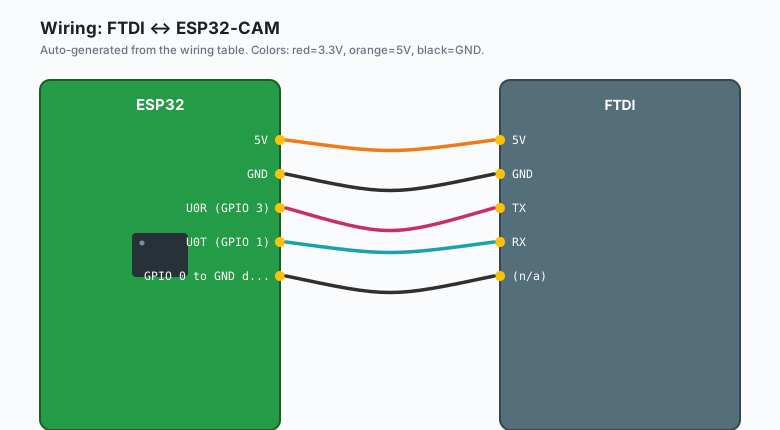
The FTDI programming wiring (same dance as every ESP32-CAM tutorial):
| FTDI | ESP32-CAM |
|---|---|
5V | 5V |
GND | GND |
TX | U0R (GPIO 3) |
RX | U0T (GPIO 1) |
| (n/a) | GPIO 0 to GND during power-up (download mode) |
The GPIO 0-to-GND jumper is the step everyone misses. Ground GPIO 0, power the board, upload, then remove the jumper and press reset.
The PIR wiring (motion trigger side):
| PIR (HC-SR501) | ESP32-CAM |
|---|---|
VCC | 5V |
GND | GND |
| OUT | GPIO 13 |
GPIO 13 is free on this board (not part of the camera or SD bus), and the HC-SR501’s output is 3.3V logic even powered from 5V, so no level shifter. Set the PIR’s time-delay pot fully counterclockwise (shortest hold time) and the sensitivity pot to the middle.
Install
Arduino IDE >> Sketch >> Include Library >> Manage Libraries, search
“ESP32 MailClient”, install the one by Mobizt (the library is
ESP_Mail_Client). It handles STARTTLS and the MIME encoding, which
are the two parts you do not want to hand-roll.
Board support for the ESP32-CAM: Tools >> Board >> ESP32 Arduino >> AI Thinker ESP32-CAM. If “ESP32 Arduino” is not in the list, the toolchain install tutorial covers it first.
The code
#include "esp_camera.h"
#include <WiFi.h>
#include <ESP_Mail_Client.h>

// AI-Thinker pin map
#define PWDN_GPIO_NUM  32
#define RESET_GPIO_NUM -1
#define XCLK_GPIO_NUM   0
#define SIOD_GPIO_NUM  26
#define SIOC_GPIO_NUM  27
#define Y2_GPIO_NUM     5
#define Y3_GPIO_NUM    18
#define Y4_GPIO_NUM    19
#define Y5_GPIO_NUM    21
#define Y6_GPIO_NUM    36
#define Y7_GPIO_NUM    39
#define Y8_GPIO_NUM    34
#define Y9_GPIO_NUM    35
#define VSYNC_GPIO_NUM 25
#define HREF_GPIO_NUM  23
#define PCLK_GPIO_NUM  22

#define PIR_PIN 13

#define SMTP_HOST "mail.yourdomain.com"
#define SMTP_PORT 587
#define SMTP_EMAIL "alerts@yourdomain.com"
#define SMTP_PASSWORD "your-app-password"
#define TO_EMAIL "you@yourdomain.com"

SMTPSession smtp;
Session_Config config;

bool cameraReady = false;

void setup() {
  Serial.begin(115200);
  pinMode(PIR_PIN, INPUT);

  camera_config_t camcfg = {};
  camcfg.ledc_channel = LEDC_CHANNEL_0;
  camcfg.ledc_timer = LEDC_TIMER_0;
  camcfg.pin_d0 = Y2_GPIO_NUM;  camcfg.pin_d1 = Y3_GPIO_NUM;
  camcfg.pin_d2 = Y4_GPIO_NUM;  camcfg.pin_d3 = Y5_GPIO_NUM;
  camcfg.pin_d4 = Y6_GPIO_NUM;  camcfg.pin_d5 = Y7_GPIO_NUM;
  camcfg.pin_d6 = Y8_GPIO_NUM;  camcfg.pin_d7 = Y9_GPIO_NUM;
  camcfg.pin_xclk = XCLK_GPIO_NUM;
  camcfg.pin_pclk = PCLK_GPIO_NUM;
  camcfg.pin_vsync = VSYNC_GPIO_NUM;
  camcfg.pin_href = HREF_GPIO_NUM;
  camcfg.pin_sccb_sda = SIOD_GPIO_NUM;
  camcfg.pin_sccb_scl = SIOC_GPIO_NUM;
  camcfg.pin_pwdn = PWDN_GPIO_NUM;
  camcfg.pin_reset = RESET_GPIO_NUM;
  camcfg.xclk_freq_hz = 20000000;
  camcfg.pixel_format = PIXFORMAT_JPEG;
  camcfg.frame_size = FRAMESIZE_VGA;
  camcfg.jpeg_quality = 12;
  camcfg.fb_count = 1;

  cameraReady = (esp_camera_init(&camcfg) == ESP_OK);
  Serial.println(cameraReady ? "camera ok" : "camera FAILED (check power)");

  WiFi.mode(WIFI_STA);
  WiFi.begin("your-wifi", "your-password");
  while (WiFi.status() != WL_CONNECTED) { delay(500); Serial.print("."); }

  config.server.host_name = SMTP_HOST;
  config.server.port = SMTP_PORT;
  config.login.email = SMTP_EMAIL;
  config.login.password = SMTP_PASSWORD;
  config.login.user_domain = "yourdomain.com";
  config.secure.mode = sec_modes::sec_starttls;   // port 587 pairing
}

bool sendPhotoEmail() {
  if (!cameraReady) return false;

  camera_fb_t *fb = esp_camera_fb_get();
  if (!fb) { Serial.println("capture failed"); return false; }

  SMTP_Message msg;
  msg.sender.name = "Driveway Cam";
  msg.sender.email = SMTP_EMAIL;
  msg.subject = "Motion at " + String(millis() / 1000) + "s uptime";
  msg.addRecipient("You", TO_EMAIL);
  msg.text.content = "The PIR fired. Photo attached.";

  // The attachment: the raw JPEG frame, base64-encoded by the library
  msg.addAttachment(SMTP_Attachment(
    /* filename */ "motion.jpg",
    /* mime     */ "image/jpeg",
    /* data     */ (const uint8_t*)fb->buf,
    /* len      */ fb->len));

  bool ok = MailClient.sendMail(&smtp, &msg);
  if (!ok) { Serial.print("SMTP failed: "); Serial.println(smtp.errorReason()); }
  esp_camera_fb_return(fb);
  return ok;
}

void loop() {
  if (cameraReady && digitalRead(PIR_PIN) == HIGH) {
    unsigned long start = millis();
    bool sent = sendPhotoEmail();
    Serial.printf("send took %lu ms, ok=%d\n", millis() - start, sent);
    delay(30000);   // cool-down: SMTP per minute is plenty, and polite
  }
  delay(200);
}
Why email, when ntfy exists
They are different tools, and the camera deserves both:
| ntfy | SMTP | |
|---|---|---|
| Delivery speed | ~2 s | 5-30 s |
| Recipient | whoever subscribes | any email address |
| App install | yes | no |
| Attachment size | fine at VGA | fine at VGA |
| Search/archive | weak | the mail client’s job |
Email wins when the recipient list is people who will never configure an app, and when you want the photos searchable in one place. ntfy wins when you want your own phone buzzed now (e.g. both channels on the same PIR event is a two-line change: call both send functions).
The Wi-Fi reconnect trap
SMTP is a long conversation (connect, TLS handshake, AUTH, send, quit: 5-15 seconds total). If the router reboots overnight, the PIR can fire with Wi-Fi down and the mail fails silently. Check and reconnect before trusting the alert:
bool wifiOk() {
  if (WiFi.status() == WL_CONNECTED) return true;
  WiFi.disconnect();
  WiFi.reconnect();
  delay(3000);
  return WiFi.status() == WL_CONNECTED;
}
Call it at the top of the motion branch, and skip the PIR event entirely when it returns false (a missed photo is better than a rebooting device).
What you learned
- The SMTP attachment is a MIME part; the Mobizt library takes the raw frame buffer pointer and length and does the encoding.
- Camera init plus TLS handshake plus send is a 10-second event: plan power and cool-downs around it (e.g. 30 s here, not 3 s).
- The PIR wiring is one GPIO; the email path is the same SMTP session pattern as the plain-alert tutorial, plus one attachment.
When something breaks
- “Camera init failed”: the power supply, almost every time. The camera and the radio together pull 300+ mA in bursts. Use a real 5V 500 mA+ source and a short thick cable.
- “Authentication failed”: the provider wants an app password, not the account password (e.g. Google Account >> Security >> 2-Step Verification >> App passwords). Create one, revoke-able per device.
- Mail sends but no attachment: some providers strip attachments over a size or quarantine unscanned ones. Send to your own address first, and check the raw message source in the mail client for the MIME boundary sections.
- Mail goes to spam: your sending domain lacks SPF/DKIM coverage for that server. That is DNS, not the ESP32. The SMTP tutorial has the details.
- Works on USB, browns out when the PIR also fires: the PIR’s 5V and the camera’s burst current share a thin wire harness. Separate supplies or a 2A source.
What to build next
- The photo-on-motion ntfy tutorial is the push-notification sibling; run both from the same PIR event.
- The SMTP alerts tutorial covers the account setup, app passwords, and the MailHog test rig in depth.
- The streaming tutorial is the live-view version of this board.
- The book IoT with ESP32 bundles the camera tutorials.