ESP32: long-term air quality with the BME680 (baseline tracking over MQTT)
Track BME680 gas resistance over days, survive the 48-hour burn-in, and publish air quality trends over MQTT so your room gets a real baseline, not a guess.
The first BME680 tutorial on this site got the four readings on screen in 25 minutes. That is the fun part. This one is the boring part, and the boring part is where air quality actually becomes useful: running the sensor for days, surviving the burn-in, finding your room’s baseline, and pushing the trend somewhere you can graph it (e.g. MQTT into whatever dashboard you already run).
The trap I hit: I trusted day-one numbers. Gas resistance read 15 KOhms, I called the air dirty, and it was really just the sensor settling. By day 3 the same empty room read 40. Nothing changed in the room. The sensor changed.
What you need
Needed
- ESP32 dev board (any WROOM board; the tutorial code uses GPIO 21/22
- BME680 breakout (Adafruit 3660, or the purple GY-BME680 clones; both
- 4 jumper wires (female-female if your breakout has a header)
- An MQTT broker to publish to (e.g. Mosquitto on a Raspberry Pi, per
Nice to have
- A soldering iron and solder (only if you solder the header pins yourself)
- Helping hands or a vise to hold the board while you work
- An anti-static wristband (cheap insurance for the ESP32’s pins)
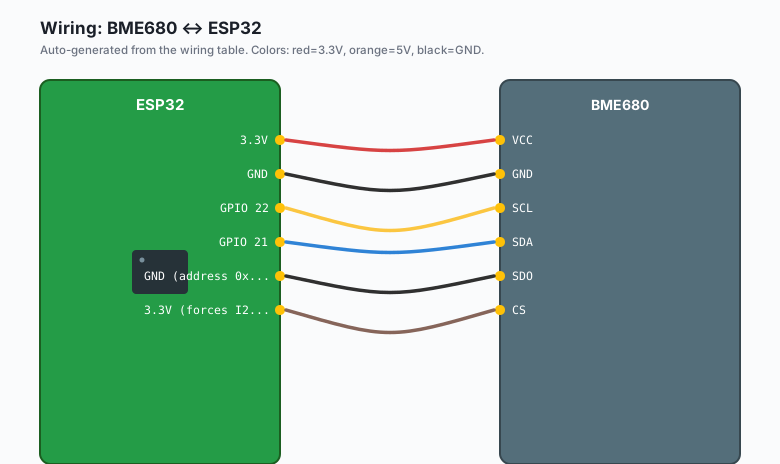
Wiring (same as the first BME680 tutorial)
| BME680 | ESP32 |
|---|---|
VCC | 3.3V |
GND | GND |
SCL | GPIO 22 |
SDA | GPIO 21 |
| SDO | GND (address 0x76) or 3.3V (0x77) |
CS | 3.3V (forces I2C mode on clones) |
Nothing here is new. The changes that matter in this tutorial are all in time and software.
Install
Arduino IDE >> Sketch >> Include Library >> Manage Libraries, and install both of these:
- “Adafruit BME680 Library” (pulls in the Bosch driver)
- “PubSubClient” by Nick O’Leary (the MQTT client)
If you do not have a broker running yet, the MQTT tutorial covers Mosquitto on a Raspberry Pi in about 10 minutes.
The code
One reading per minute, published to MQTT, with the burn-in state tracked in NVS so a power cycle does not reset your clock.
#include <Wire.h>
#include <Adafruit_BME680.h>
#include <PubSubClient.h>
#include <WiFi.h>
#include <Preferences.h>

#define SEALEVELPRESSURE_HPA (1013.25)
#define READ_INTERVAL_MS 60000UL   // one reading per minute

Adafruit_BME680 bme;
WiFiClient wifiClient;
PubSubClient mqtt(wifiClient);
Preferences prefs;

unsigned long poweredMinutes = 0;   // burn-in clock, persisted

void setup() {
  Serial.begin(115200);
  Wire.begin(21, 22);

  if (!bme.begin(0x76)) {
    Serial.println("BME680 not found (check CS tie-high on clones)");
    while (1) delay(1000);
  }
  bme.setTemperatureOversampling(BME68X_OS_16X);
  bme.setHumidityOversampling(BME68X_OS_2X);
  bme.setPressureOversampling(BME68X_OS_16X);
  bme.setIIRFilterSize(BME68X_IIR_FILTER_SIZE_3);
  bme.setGasHeater(320, 150);

  WiFi.mode(WIFI_STA);
  WiFi.begin("your-wifi", "your-password");
  while (WiFi.status() != WL_CONNECTED) { delay(500); Serial.print("."); }

  mqtt.setServer("192.168.1.50", 1883);   // your broker

  prefs.begin("bme680", false);
  poweredMinutes = prefs.getULong("poweredMin", 0);
  Serial.printf("Burn-in clock: %lu minutes\n", poweredMinutes);
}

bool publishReading(float temp, float hum, float pres, float gas) {
  if (!mqtt.connected()) {
    // client id must be unique per device on the broker
    if (!mqtt.connect("bme680-aq-1")) return false;
  }
  String base = "home/air/room1";
  mqtt.publish((base + "/temperature").c_str(), String(temp, 2).c_str(), true);
  mqtt.publish((base + "/humidity").c_str(),   String(hum, 1).c_str(), true);
  mqtt.publish((base + "/pressure").c_str(),   String(pres, 1).c_str(), true);
  mqtt.publish((base + "/gas_kohms").c_str(),  String(gas, 1).c_str(), true);
  mqtt.publish((base + "/burnin_minutes").c_str(), String(poweredMinutes).c_str(), true);
  mqtt.publish((base + "/burnin_done").c_str(),
               poweredMinutes >= 2880 ? "true" : "false", true);
  return true;
}

void loop() {
  static unsigned long lastRead = 0;

  if (millis() - lastRead >= READ_INTERVAL_MS) {
    lastRead = millis();

    unsigned long endTime = bme.beginReading();
    if (endTime == 0) { Serial.println("reading failed"); return; }
    delay(endTime - millis());
    if (!bme.endReading()) { Serial.println("read incomplete"); return; }

    poweredMinutes++;   // one reading per minute = the burn-in clock
    prefs.putULong("poweredMin", poweredMinutes);

    float gasK = bme.gas_resistance / 1000.0;
    Serial.printf("T %.1f C  RH %.1f %%  P %.1f hPa  Gas %.1f KOhm  (%lu min)\n",
                  bme.temperature / 100.0, bme.humidity / 1000.0,
                  bme.pressure / 100.0, gasK, poweredMinutes);

    publishReading(bme.temperature / 100.0, bme.humidity / 1000.0,
                   bme.pressure / 100.0, gasK);
  }
  mqtt.loop();
  delay(100);
}
The burn-in, and why day-one numbers lie
Bosch specs 48 hours of powered operation before the gas channel’s baseline is stable. What actually happens: the gas resistance drifts downward for the first day (sometimes most of two days), the slope flattens, and then the readings become comparable to each other. The drift is not noise. It is the heater element conditioning. There is no way to skip it, only to account for it.
Practical rules that come out of this:
- Do not write any thresholds before hour 48. They will be wrong.
- Do not compare today’s number to last week’s number unless the sensor has been powered the whole time. Every power cycle restarts some settling (the code’s NVS counter makes this visible).
- After burn-in, the only meaningful comparison is sensor-vs-itself: now vs its own clean-room baseline.
Baseline tracking: the 24-hour rolling baseline
The absolute ohm value is per-unit and per-room. What you want is a rolling window of your own readings and a deviation from that. The simple version, computable on the ESP32 itself:
// Keep a 24-hour ring of gas readings (1440 one-minute samples),
// compute the median, and publish the ratio.
const int N = 1440;
float gasRing[N];
int ringIdx = 0, ringCount = 0;

void addSample(float gasK) {
  gasRing[ringIdx] = gasK;
  ringIdx = (ringIdx + 1) % N;
  if (ringCount < N) ringCount++;
}

float baselineMedian() {
  static float scratch[N];               // avoid sorting in place
  memcpy(scratch, gasRing, ringCount * sizeof(float));
  // insertion sort is fine at this size on a 1 Hz cadence
  for (int i = 1; i < ringCount; i++) {
    float v = scratch[i]; int j = i - 1;
    while (j >= 0 && scratch[j] > v) { scratch[j+1] = v == v ? scratch[j] : scratch[j]; j--; }
    scratch[j+1] = v;
  }
  return scratch[ringCount / 2];
}
Publish gas_kohms / baseline_median as a ratio. Clean air sits near
1.0, cooking drops it to 0.2 or lower, and it recovers over an hour or
two (e.g. 0.3 at 6pm, 0.9 by 8pm after dinner cooking). The ratio is
what you alert on, not the raw ohms.
The ring buffer plus median costs about 6 KB of RAM and a sort of a 6 KB array once per published ratio (do it every 10 readings, not every reading, or the ESP32 spends its life sorting). Median, not mean: one cooking event should not poison the baseline it is being measured against.
Reading the trends in a dashboard
Subscribe with anything that speaks MQTT (e.g. MQTT Explorer on the desktop for a quick look, or Grafana over Mosquitto for the real setup). Two views are worth having:
- The last 24 hours at one-minute resolution: this shows events (cooking, a window opened, a solvent smell).
- The last 30 days at one-sample-per-hour resolution: this is your seasonal drift, heating season vs not, and the sensor’s aging.
The burn-in flag matters here. Graph gas_kohms for the first week
and you will see the settling curve; after that the curve flattens and
events start standing out. If you publish burnin_done as a retained
flag (the code above does), dashboards can grey out everything before
it.
What you learned
- The BME680 gas channel needs 48 hours of powered burn-in before baselines mean anything, and every power cycle partially restarts it.
- Baselines are self-relative: a 24-hour rolling median turned into a ratio is the usable form, not absolute KOhms.
- MQTT with retained flags (e.g. burnin_done) is how the sensor’s state survives reboots and stays visible to every subscriber.
When something breaks
- “BME680 not found”: on the purple clones, CS must be tied to 3.3V or the chip never enumerates on I2C. Run an I2C scanner; expect 0x76 with SDO low, 0x77 with SDO high.
- MQTT connects then drops every few minutes: you are publishing too fast for a keep-alive window, or two devices share a client ID (the broker kicks the older one). Check the client ID in mqtt.connect() is unique per board.
- Baseline ratio pegged at 1.0 and never moves: the ring buffer never got samples. If you reset the board, ringCount restarts at 0 and the ratio is meaningless until an hour of data exists; gate the publishing on ringCount > 60.
- Gas numbers drifted after a firmware update: the heater config changed (320 degrees, 150 ms is this tutorial’s setting; the Bosch default in some examples is 300/100). Same board, same room, but a different heater profile is not the same sensor. Pin the profile.
What to build next
- The air quality monitor project puts these readings on an OLED for the room-without-a-dashboard version.
- The SMTP email tutorial is the right channel for the once-a-week digest (“your baseline moved 15% this week”), not for one-minute data.
- The first BME680 tutorial covers the raw four-reading basics this post assumes.
- The book IoT with ESP32 bundles the sensor tutorials.