ESP32: gesture, proximity, and color sensing with the APDS9960
Wire an APDS9960 to an ESP32 and read swipes, hand distance, and ambient color over I2C. One $4 sensor, three sensors inside, plus the level-shifter trap.
The APDS9960 is the sensor that made touchless control cheap. It is the chip inside the old Samsung Galaxy S5 for hand-wave air gestures, and a breakout costs about $4. Three sensors share one I2C address: a proximity detector (raw IR reflection, good to about 20 cm), a four-direction gesture engine (up, down, left, right swipes), and an RGB color sensor plus ambient light. For contact-free switching (e.g. waving over a trash can lid, dimming a lamp without touching the wall switch) it is the part to reach for.
The trap: power. The APDS9960 is a 3.3V chip with no 5V tolerance, and
a lot of the cheap purple breakouts sold today wire VCC straight to
the sensor rail with no regulator. Feeding one 5V kills it, and the
failure is not dramatic: the board warms slightly, begin() starts
returning false, and you spend an hour blaming the library. The second
trap is the interrupt line. Every APDS9960 example wires INT somewhere,
and if you leave it floating the sketch still seems to work until the
first gesture, at which point the interrupt latch holds the sensor in
a state you did not expect.
What you need
Needed
| Item | Qty | Purpose | Est. cost |
|---|---|---|---|
| ESP32 dev board | 1 | the brain | $8-$15 |
| APDS9960 breakout (SparkFun or the GY-9960 clone) | 1 | gesture/proximity/color sensor | $4 |
| Jumper wires | 5 | I2C + interrupt connections | $2 |
The SparkFun breakout has a level-shifting regulator arrangement and clear silk; the GY-9960 clone is half the price and works identically as long as you respect the 3.3V rule. Both have the same footprint (VCC, GND, SCL, SDA, IRQ).
Nice to have
- Multimeter to confirm the module’s VCC is actually 3.3V before first power-up (worth it on the purple clone boards)
- Breadboard and wire stripper for a tidy I2C bus
- Anti-static wristband and soldering mat: the bare sensor on these boards is an exposed die, worth the caution
- Soldering iron and solder if your breakout has an unsoldered header
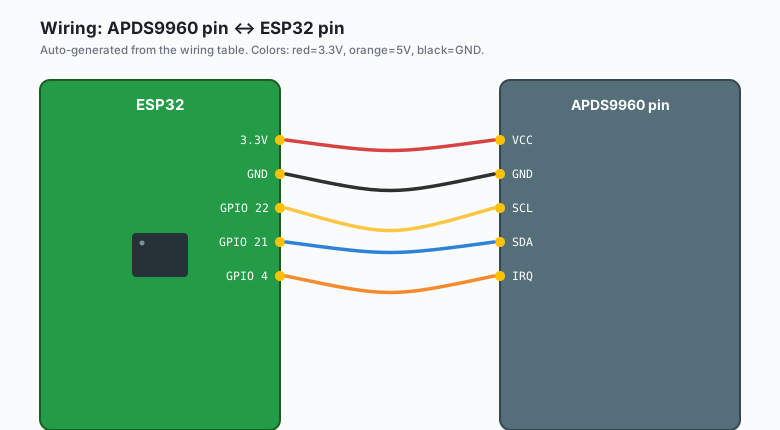
Wiring (I2C)
| APDS9960 pin | ESP32 pin |
|---|---|
VCC | 3.3V |
GND | GND |
SCL | GPIO 22 |
SDA | GPIO 21 |
IRQ | GPIO 4 |
The I2C address is fixed at 0x39 and cannot be changed, so exactly one APDS9960 per bus. The sensor window on the board must face the hand; mounting it behind a plastic or glass panel works but costs a little range.
Check the module’s VCC rail with a multimeter before wiring it to the ESP32. If the board has no onboard regulator, VCC must come from the 3V3 pin, never 5V. The IRQ pin is an open-drain output; GPIO 4 with the ESP32’s internal pull-up is all it needs.
Install
Arduino IDE >> Sketch >> Include Library >> Manage Libraries >> search “APDS9960” >> install Adafruit APDS9960. It covers proximity, gesture, and color in one library with no extra dependencies.
The code
This sketch runs all three sensors in sequence, in a loop, with the interrupt pin handled properly:
#include <Wire.h>
#include <Adafruit_APDS9960.h>

Adafruit_APDS9960 apds;

#define IRQ_PIN 4

void setup() {
  Serial.begin(115200);
  pinMode(IRQ_PIN, INPUT_PULLUP);

  if (!apds.begin(0x39)) {
    Serial.println("APDS9960 not found, check wiring");
    while (1) delay(1000);
  }

  // Gesture engine: needs the proximity pipeline running underneath it
  apds.enableGesture(true);

  // Proximity with interrupt at threshold (0 = far, 255 = touching)
  apds.setProxInterruptThreshold(0, 25, 3);
  apds.enableProximity(true);
  apds.enableProximityInterrupt();

  // Color sensing: 100 ms integration is a good indoor default
  apds.enableColor(true);
}

void loop() {
  // 1. Gestures: non-blocking read, returns UP/DOWN/LEFT/RIGHT or 0
  uint8_t g = apds.readGesture();
  if (g == APDS9960_DOWN) Serial.println("DOWN");
  if (g == APDS9960_UP)   Serial.println("UP");
  if (g == APDS9960_LEFT) Serial.println("LEFT");
  if (g == APDS9960_RIGHT) Serial.println("RIGHT");

  // 2. Proximity: poll the raw value
  uint8_t prox = apds.readProximity();
  if (prox > 200) {
    Serial.println("Hand very close");
  }

  // 3. Color: 16-bit red, green, blue + clear channel
  uint16_t r, gr, b, c;
  while (!apds.colorDataReady()) delay(5);
  apds.getColorData(&r, &gr, &b, &c);
  if (c > 0) {
    Serial.printf("prox %3u  RGB %5u %5u %5u  clear %5u\n", prox, r, gr, b, c);
  }

  // Clear the interrupt latch or gestures stop arriving
  if (!digitalRead(IRQ_PIN)) {
    apds.clearInterrupt();
  }

  delay(20);
}
Wave a hand about 5 to 10 cm above the sensor: UP, DOWN, LEFT, RIGHT print as you swipe. Cover the sensor and proximity climbs toward 255. Point a red phone flashlight at it and the red channel dominates the RGB line.
Making the color values mean something
Raw RGB channels are not RGB-255 values. Each channel is a 16-bit count that depends on the integration time, so the useful move is to normalize against the clear channel:
float red_pct   = 100.0 * r / c;
float green_pct = 100.0 * gr / c;
float blue_pct  = 100.0 * b / c;
// red_pct + green_pct + blue_pct ~= 100 under a neutral light
With that normalization you can classify by simple thresholds (e.g. red_pct over 45 under a white lamp means something red is in front). For real color matching, hold the object 1 to 2 cm away, use the same light source every time, and calibrate against two known objects.
Proximity and gesture share the IR LED, so they do not run simultaneously in all configurations. If gestures stop working after you enable high-frequency proximity polling, drop the proximity poll rate or switch proximity to interrupt-only (the sketch above already does the latter).
A touchless lamp switch, the payoff build
Everything above exists for this: swipe left or right to dim a lamp, wave up to turn it on, down to turn it off. The logic layer:
int brightness_pct = 0;

void applyGesture(uint8_t g) {
  if (g == APDS9960_UP   && brightness_pct == 0) brightness_pct = 50;
  if (g == APDS9960_DOWN)                        brightness_pct = 0;
  if (g == APDS9960_LEFT  && brightness_pct > 0) brightness_pct -= 10;
  if (g == APDS9960_RIGHT && brightness_pct < 100) brightness_pct += 10;

  // Drive a PWM LED (the PWM with LEDC tutorial covers the setup):
  // ledcWrite(LED_PIN, brightness_pct * 255 / 100);
}
That is the whole control layer; the LEDC PWM tutorial supplies the output half, and the Matter light tutorial is where this same gesture switch becomes a real smart-home device the house can see.
What you learned
- The APDS9960 stacks three sensors behind one I2C address, and each one enables independently: gesture needs proximity’s pipeline, color runs on its own.
- The IRQ line and
clearInterrupt()are not optional; an uncleared latch silently stalls gesture reporting. - Raw RGB counts need normalization against the clear channel before they mean anything as “color.”
When something breaks
begin()fails: 90% of the time the module got 5V somewhere or the I2C wiring is swapped. Run the ESP32 I2C scanner sketch (GPIO 21 SDA, GPIO 22 SCL) and expect 0x39. No device means wiring; device present butbegin()still fails means the sensor is dead.- Gestures print nothing: the hand is too close (under 3 cm) or moving too slowly, or the interrupt latch was never cleared. Wave 5 to 10 cm away at a normal swipe speed and confirm the IRQ pin toggles.
- Proximity reads 255 constantly: something is permanently in front of the window, or the module is face-down on a reflective desk mat. Give it 10 cm of clear air.
- Readings drift as the room brightens: ambient IR from sunlight leaks into the proximity measurement. This is physics, not a bug; shade the sensor or increase the interrupt threshold.
- Works alone, fails next to another I2C device: the bus is marginal (long wires, too many pull-ups). The APDS9960 boards carry their own pull-ups, so remove extra ones elsewhere on the bus.
What to build next
- The Matter light tutorial turns the touchless lamp into a real smart-home light with this as its invisible switch.
- Pair with the OLED SSD1306 tutorial: gestures scroll the menu, proximity wakes the screen (e.g. wave once to wake, wave again to act).
- The BH1750 ambient light tutorial is the dedicated light meter when you care about lux and not about gestures.
- The camera motion + ntfy tutorial is the escalation path: the same “something moved near the sensor” idea, with photos.
The book IoT with ESP32 bundles the sensor tutorials including this one.