Arduino: microwave radar motion detection with the RCWL-0516
Detect motion through walls and plastic with the RCWL-0516 microwave radar module. Doppler sensing that ignores temperature, sunlight, and thin drywall.
Most motion sensors you meet are PIR: they detect moving heat, so they fail exactly when you would notice (a person in a heavy coat, a cold morning, direct sunlight). The RCWL-0516 is the other kind. It is a Doppler radar on a $1 board: it transmits a continuous 3.18 GHz wave and watches for the frequency shift that a moving object causes in the reflection. It does not care about temperature, it sees through plastic enclosures and thin drywall, and it triggers on anything that moves, including the ceiling fan you forgot about.
The trap I hit: I mounted it the way I mount PIRs, flat on the wall behind a bookshelf, and got a trigger every time the fan on my desk PC spun up. Microwave radar does not distinguish “person” from “anything moving”, and it looks through the shelf, the fan, and the cabinet door. Placement is the entire game with this sensor, and reading this paragraph is cheaper than a week of rewiring.
What you need
Needed
| Item | Qty | Purpose | Est. cost |
|---|---|---|---|
| Arduino Uno or Nano | 1 | reads the OUT pin, times retrigger windows | $10-$25 |
| RCWL-0516 microwave radar module | 1 | the motion sensor itself | $2 |
| Jumper wires (3) | 3 | OUT, 5V, GND | $1 |
Nice to have
- Breadboard: for bench testing before you commit to a mounting spot (placement experiments are the whole tuning process)
- Plastic project enclosure: the sensor fires straight through most plastics, so the finished build can live inside a box
- Multimeter: the OUT pin swings 0 to about 3.3V; a meter confirms trigger behavior before the code looks at it
- Magnifying goggles: the pot markings (sensitivity, time delay) are printed small on the silkscreen
- Wire stripper: if you are moving the module off a breadboard onto a permanent mount
Wiring
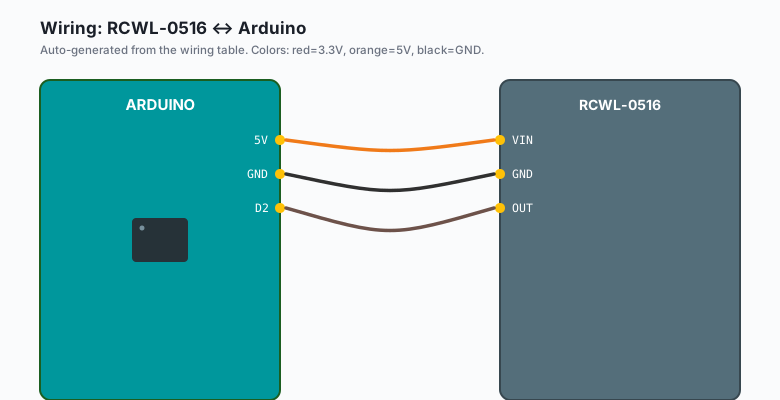
Three wires. The RCWL-0516 is a digital output sensor: it drives OUT HIGH (about 3.3V, high enough for a 5V Arduino to read HIGH) while it detects motion.
| RCWL-0516 | Arduino |
|---|---|
VIN | 5V |
GND | GND |
| OUT | D2 |
The module has two potentiometers and one solder pad. The pot near the antenna side is sensitivity (clockwise = longer range), the one labeled CDS is a light-sensor threshold, and the C-T pad adds a capacitor for a longer output hold. Do not add the capacitor until you have watched the default behavior in the Serial Monitor.
Mount it flat against (or inside) the final enclosure with the component side facing the area you want to watch. Range is roughly 5-7 meters in an open room.
Install
Nothing to install. This sensor is a plain digital input (like a
pushbutton that presses itself), and every library you might be
tempted to add does less than three lines of digitalRead do.
That is rare, enjoy it: there is nothing to fetch from
Arduino IDE >> Sketch >> Include Library >> Manage Libraries at all.
The code
const int OUT = 2;

void setup() {
  Serial.begin(115200);
  pinMode(OUT, INPUT);
  Serial.println("RCWL-0516 radar ready. Wave at it.");
}

void loop() {
  static unsigned long lastTrigger = 0;
  static int state = 0;

  if (digitalRead(OUT) == HIGH) {
    if (state == 0) {                       // rising edge
      Serial.print("MOTION at t=");
      Serial.print((millis() - lastTrigger) / 1000);
      Serial.println("s since previous");
      lastTrigger = millis();
      state = 1;
    }
  } else {
    state = 0;                              // OUT has dropped: re-armed
  }
}
Open the Serial Monitor at 115200 and move. The interesting number is the gap between triggers: the sensor holds OUT HIGH for about 2 seconds after motion stops (its fixed retrigger window), so the code waits for the falling edge before it re-arms. Without that edge check you get one “MOTION” line and a wall of nothing, because OUT never went LOW long enough to count as a new event.
For a real project the trigger becomes an event: light a relay, wake the ESP32 from deep sleep, or send a notification. The edge-detect pattern stays identical.
Tuning range and ignoring your own fan
Two adjustments, both physical:
- Sensitivity pot (the one near the board edge): quarter-turn steps, test each one by walking away until you stop triggering, then one quarter-turn back up. Full clockwise reaches through a wall into the next room, which is a feature only if you wanted it.
- Placement: the beam is broad and it does not stop at boundaries. Keep it away from fans, curtains, and anything on motors (a refrigerator compressor triggers it every cycle). If you only want the hallway, point it at the hallway and let the drywall block the living room, not the other way around.
(e.g. my final hallway install sits 2 m above the floor, tilted slightly downward, sensitivity at about 40%: it catches a person crossing the hall and ignores the cat, mostly.)
What you learned
- Doppler radar detects motion, not heat: the frequency shift of a reflected wave is the signal, and it works through plastic and drywall.
- Digital-output sensors still need edge detection in software: the
module’s own hold time means a naive
digitalReadloop under- counts events. - Placement and pot tuning do more for reliability than any code change you will make.
When something breaks
- Triggers constantly with nobody moving: the classic. Fans, AC vents moving a curtain, a spinning washing machine, or oversensitivity. Drop the sensitivity pot a quarter-turn and re-test; then hunt moving objects in the beam path.
- Never triggers: 5V not actually reaching VIN (measure it), or the module is face-down, or the object moves too slowly (Doppler needs real velocity; a plant drifting in the draft will not register, and neither will a person standing perfectly still, by physics, not by bug).
- Random 2-second gaps in output: that is the module’s fixed hold time, not a fault. If your project needs tighter timing, note the falling-edge timestamp in code, which this sketch already does.
- Triggers when the relay clicks nearby: the module picks up its own switching noise. Put 30 cm between the RCWL-0516 and any relay coil, or snub the relay with a flyback diode.
- Works on the desk, fails in the enclosure: if the enclosure is metal, the radar is boxed in. Plastic only. (A metal box is also a nice Faraday cage for the Wi-Fi project you were about to blame for the dead sensor.)
What to build next
- The night security light tutorial is the PIR version of the same idea: motion in, relay out. This module slots into that circuit unchanged when a PIR keeps failing on cold mornings.
- The ESP32 deep sleep tutorial plus this sensor is the battery-powered motion logger: radar wakes the ESP32, the ESP32 reports, then sleeps again.
- The ESP32 ntfy notifications tutorial turns this from a local blink into a phone alert, still self-hosted.
- The DS3231 RTC tutorial timestamps every radar event if you want a motion log with a clock that survives power cuts.
The IoT with ESP32 book bundles the sleep, notify, and log tutorials into one chapter arc that starts with a sensor like this one.