Arduino: read water quality with the TDS module
Measure total dissolved solids with the Gravity TDS module on an Arduino: clean wiring, temperature compensation, calibration, and what TDS cannot tell you.
TDS (total dissolved solids) is the “is my water filter actually doing anything” number. The Gravity analog TDS kit is a probe plus a small interface board, it plugs into an ADC pin like any other sensor, and this build prints a compensated ppm reading to the serial monitor once a second.
The trap is expecting chemistry from a conductivity meter. TDS does not identify what is dissolved; it estimates the total (e.g. it counts the good minerals and the bad salts as the same “stuff”). It also drifts about 2 percent per degree C, so an uncompensated reading is a mood, not a measurement. This tutorial wires a DS18B20 alongside and compensates properly.
What you need
Needed
- Arduino Uno or Nano
- Gravity analog TDS sensor kit: probe + interface board (about $20)
- DS18B20 waterproof temperature probe plus a 4.7k ohm resistor (about $3; the compensation math is worth more than the sensor)
- Breadboard and jumper wires
Nice to have
- Soldering iron, solder, stand, and helping hands (header work on the interface board if it ships bare)
- Wire stripper, multimeter
- Anti-static wristband, magnifying goggles, soldering mat
- Distilled water and one known reference solution (e.g. a 342 ppm conductivity standard) for a one-point calibration check
- Small cups, and a stand or clamp so the probe hangs in the sample without touching the cup walls
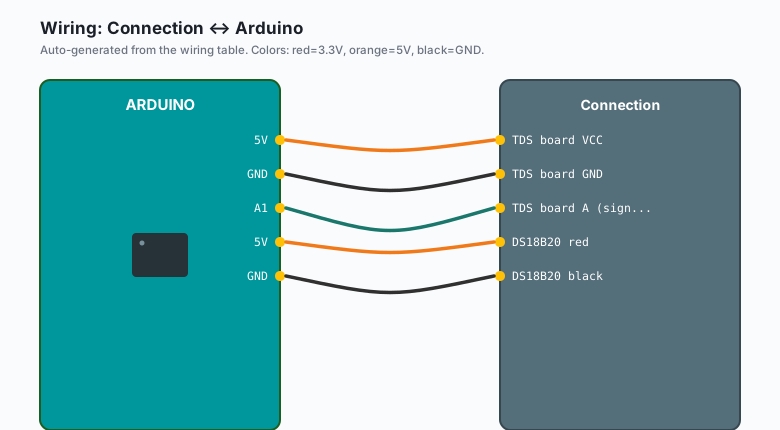
Wiring
| Connection | Arduino |
|---|---|
TDS board VCC | 5V |
TDS board GND | GND |
| TDS board A (signal) | A1 |
| DS18B20 red | 5V |
| DS18B20 black | GND |
| DS18B20 yellow | D2, with the 4.7k resistor to 5V |
The signal output stays under about 3.4V even on a 5V supply, so the Uno ADC reads it directly. Keep the probe cable away from motors and relay coils; pump noise shows up as phantom ppm.
Install
One library pair, from the Library Manager:
- Arduino IDE >> Sketch >> Include Library >> Manage Libraries >> search “OneWire” >> Install
- Same path, search “DallasTemperature” >> Install
The code
// TDS with DS18B20 temperature compensation. Prints once per second.
#include <OneWire.h>
#include <DallasTemperature.h>

const int PIN_TDS = A1;
const int PIN_ONEWIRE = 2;
const float VREF = 5.0;
const float ADC_MAX = 1024.0;
const float CAL = 1.0;    // nudge this against a known solution

OneWire oneWire(PIN_ONEWIRE);
DallasTemperature temp(&oneWire);

float readVoltage() {
  int s[10];                                   // sample 10, trim, average 6
  for (int i = 0; i < 10; i++) { s[i] = analogRead(PIN_TDS); delay(5); }
  for (int i = 0; i < 9; i++)
    for (int j = i + 1; j < 10; j++)
      if (s[j] < s[i]) { int t = s[i]; s[i] = s[j]; s[j] = t; }
  long sum = 0;
  for (int i = 2; i < 8; i++) sum += s[i];
  return (sum / 6.0) * VREF / ADC_MAX;
}

void setup() {
  Serial.begin(9600);
  temp.begin();
}

void loop() {
  temp.requestTemperatures();
  float tC = temp.getTempCByIndex(0);
  if (tC == -127.0) tC = 25.0;    // sensor missing: fall back to nominal

  float v = readVoltage();
  float comp = 1.0 + 0.02 * (tC - 25.0);          // 2% per degree C
  float v25 = v / comp;
  float tds = (133.42*v25*v25*v25 - 255.86*v25*v25 + 857.16*v25) * 0.5 * CAL;

  Serial.print(tC, 1); Serial.print(" C   ");
  Serial.print(v, 3);  Serial.print(" V   ");
  Serial.print(tds, 0); Serial.println(" ppm");
  delay(800);
}
Sanity ranges, so you know when the number is lying: distilled water lands near 0-20 ppm, most tap water between 100 and 400, hydroponic nutrient 800-1500, and seawater is far above the module’s range (0-1000 ppm).
What you learned
- TDS is conductivity wearing a ppm costume: the board measures conductance, the standard curve converts it, and temperature bends the curve.
- Trimmed-mean sampling (drop the extremes of 10 reads) kills most of the ADC noise without a filter library.
- Compensation belongs in the voltage, before the curve, not in the final number.
When something breaks
- Reads 0 ppm in actual water: probe connector loose, or the signal wire is on the wrong A-pin. Wiggle the BNC-style connector; the reading should appear instantly.
- Negative or exploding ppm values: the DS18B20 is not answering (check the 4.7k pull-up; -127 means “not found”), or the probe is in air.
- Number creeps up over minutes: the probe needs 2-3 minutes to stabilize in a new sample, and biofilm or mineral scale on the electrodes does the same thing. Rinse in distilled water and dry between samples.
- Jumpy by tens of ppm: USB power noise, or the probe cable runs next to a motor or pump wire. Separate them; add the trimmed-mean if you have not.
- Reads high against the 342 ppm standard: nudge
CAL(e.g. measured 380 against a true 342 means CAL = 342/380, about 0.9). - Probe left in water for weeks: biofilm grows on the electrodes and every reading drifts. Rinse weekly; this is a sampling instrument, not a permanently installed lab probe.
What to build next
- Put the reading on a screen at the tank with the LCD I2C tutorial.
- Combine this with the MQ-2 alarm’s buzzer pattern: out-of-range ppm, same beep logic, new meaning.
- The ESP32 plant monitor covers the irrigation side, and esp32 MQTT publish/subscribe logs every reading to your own broker (self-hosted, no cloud subscription and no third-party dashboard in the path).