Arduino: voice control with a DFPlayer or voice-recognition module
Voice control on Arduino without the cloud: the DF2301Q offline voice module drives lights and sounds, and a DFPlayer Mini gives the project a voice back.
Two different modules get called “voice modules,” and mixing them up is the number-one way this project goes wrong on the shopping page. The DFPlayer Mini is a speaker, not a listener: it plays MP3 files off a microSD card and understands nothing. The DFRobot DF2301Q is the opposite: it listens, but only to a fixed vocabulary of about 200 built-in commands, offline, no cloud. This build uses both: say “turn on the light” and the LED obeys, and the DFPlayer talks back so you know it heard you.
The trap to name early: the DF2301Q does not understand free speech. It matches a fixed phrase list (e.g. “turn on the light”, “play music”, “what time is it”), and anything outside the list is silence as far as your code is concerned. If you want arbitrary phrases or a custom wake word, that is a phone app or an ESP32 wake-word project, not this module.
What you need
Needed
- Arduino Uno or Nano
- DFRobot Gravity DF2301Q offline voice-recognition module (about $12)
- DFPlayer Mini MP3 module (about $4)
- 3W, 8 ohm speaker (about $3; connect to SPK1 and SPK2, not the DAC pins)
- One 1k ohm resistor (in series on the DFPlayer’s RX line; its logic is 3.3V and the Uno’s TX is 5V)
- MicroSD card, 8 GB or smaller, formatted FAT32
- LED and 220 ohm resistor, breadboard, jumper wires
Nice to have
- Soldering iron, solder, stand, and helping hands (both modules usually ship with bare headers)
- Wire stripper and multimeter
- Anti-static wristband, magnifying goggles, soldering mat
- A quiet room: voice modules and workshop noise do not mix
Wiring
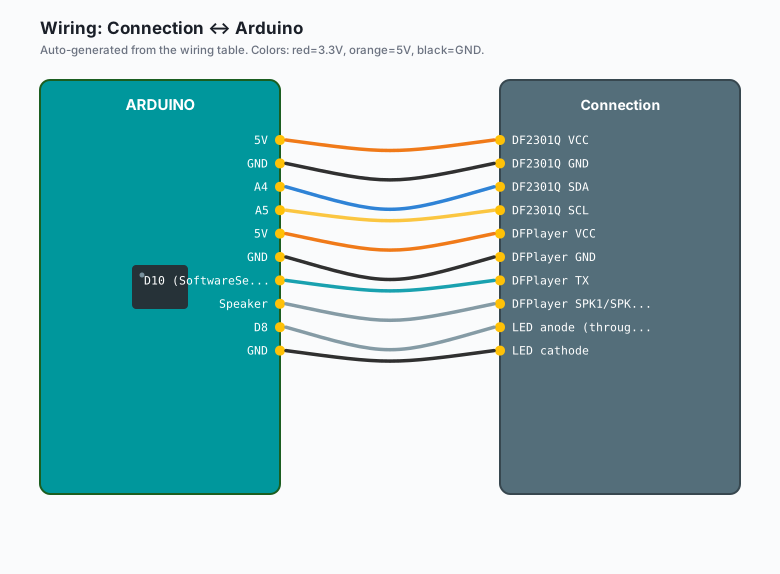
| Connection | Arduino |
|---|---|
DF2301Q VCC | 5V |
DF2301Q GND | GND |
DF2301Q SDA | A4 |
DF2301Q SCL | A5 |
DFPlayer VCC | 5V |
DFPlayer GND | GND |
DFPlayer TX | D10 (SoftwareSerial RX) |
DFPlayer RX | D11, through the 1k resistor |
| DFPlayer SPK1/SPK2 | Speaker |
| LED anode (through 220 ohm) | D8 |
| LED cathode | GND |
Keep the DFPlayer’s wiring away from the DF2301Q’s mic. The mic hears speaker pop as noise, and then the module “wakes up” every time a sound plays. A few centimeters of distance fixes it.
Install
Two libraries, both in the Library Manager:
- Arduino IDE >> Sketch >> Include Library >> Manage Libraries >> search “DFRobot_DF2301Q” >> Install
- Same path, search “DFRobotDFPlayerMini” >> Install
Prepare the SD card on your computer: FAT32, a folder named mp3, and files
named 0001.mp3, 0002.mp3, 0003.mp3 inside it (e.g. “light on”, “light
off”, “playing music”). The DFPlayer refuses anything else.
The code
// DF2301Q (I2C listener) + DFPlayer (speaker). Fixed command IDs only.
#include <Wire.h>
#include "DFRobot_DF2301Q.h"
#include <SoftwareSerial.h>
#include <DFRobotDFPlayerMini.h>

DFRobot_DF2301Q_I2C voice;
SoftwareSerial mp3Serial(10, 11);   // RX=10 <- DFPlayer TX, TX=11 -> DFPlayer RX
DFRobotDFPlayerMini mp3;

const int PIN_LED = 8;
uint8_t lastCmd = 0;

void setup() {
  Serial.begin(9600);
  pinMode(PIN_LED, OUTPUT);

  if (!voice.begin()) {
    Serial.println("DF2301Q not found: check A4/A5, power, address 0x64");
    while (1) delay(100);
  }
  voice.setVolume(15);              // start mid-scale, adjust by ear

  mp3Serial.begin(9600);
  if (!mp3.begin(mp3Serial)) {
    Serial.println("DFPlayer not found: check 1k on RX, FAT32 SD, /mp3 files");
  }
  mp3.volume(18);
  Serial.println("Say the wake word, then a command.");
}

void loop() {
  uint8_t cmd = voice.getCMDID();   // 0 = nothing new
  if (cmd == 0 || cmd == lastCmd) return;   // act on NEW commands only
  lastCmd = cmd;

  Serial.print("heard ID ");
  Serial.println(cmd);
  switch (cmd) {
    case 5:  digitalWrite(PIN_LED, HIGH); mp3.play(1); break; // "turn on the light"
    case 6:  digitalWrite(PIN_LED, LOW);  mp3.play(2); break; // "turn off the light"
    case 7:  mp3.play(3); break;                              // "play music"
    default: break;                                           // heard, ignored
  }
}
The lastCmd check matters. Without it, one spoken phrase repeats its action
on every loop pass. If you need a phrase to be repeatable (“next song” twice),
act on the command again only after a short timeout.
What you learned
- “Voice module” covers two unrelated jobs: recognition (DF2301Q, I2C, fixed vocabulary) and playback (DFPlayer, serial, SD card files).
- The offline module is speaker-independent but phrase-locked: commands arrive as integer IDs, and your code switches on IDs.
- Act on new IDs only, or every loop re-fires the last command.
When something breaks
- “DF2301Q not found”: SDA and SCL swapped, or the module is unpowered. Run an I2C scanner; it should answer at 0x64. No answer means wiring.
- Module ignores you: you skipped the wake word, you are farther than about half a meter, or the room is loud. Speak from 30-50 cm.
- “DFPlayer not found”: SD card is exFAT instead of FAT32, files are not
under
/mp3/, or the 1k resistor is missing on the RX line. - Garbage on the serial monitor: TX and RX are not crossed, or the SoftwareSerial pins are swapped in code. D10 listens, D11 talks.
- Uno resets when the speaker plays loudly: power sag. Power the DFPlayer from its own 5V feed with a 100-470 uF capacitor across its supply, common ground with everything else.
- Commands fire twice: you are acting on a repeated CMDID. Add the lastCmd check from the sketch.
What to build next
- Give the traffic light a voice: “turn on the pedestrian crossing” switches the state machine by hand.
- Bolt the listener onto the night security light so “security mode on” arms it, and the DFPlayer confirms with a clip.
- If you outgrow the fixed list, the ESP32 wake-word detection tutorial runs a real always-on wake word, and esp32 ntfy notifications gives the same project a self-hosted phone alert.