Arduino: datalogger with RTC + SD card for timestamped sensor files
Log sensor readings to an SD card with real timestamps from a DS3231 RTC. CSV files your spreadsheet opens directly, and a clock that survives power cuts.
A sensor with no timestamp is a rumor. A room-temperature graph is useless if every reading is “a while ago”. The datalogger is the project that fixes this forever: a DS3231 RTC (real-time clock) that keeps time through power cuts on its coin cell, an SD card that survives unplugging, and a sketch that writes one CSV line per reading. Open the card in your computer and the file is already a spreadsheet.
I built my first logger without the RTC because “the millis() count plus a boot time is close enough”. The trap: millis() forgets everything on power loss, and my garage lost power more often than I expected. Six months of data with drifting, meaningless time values went in the bin. The DS3231 is $3, it is battery-backed, and it is accurate to about 2 minutes per year. There is no version of this project worth building without one.
What you need
Needed
| Item | Qty | Purpose | Est. cost |
|---|---|---|---|
| Arduino Uno or Nano | 1 | reads the sensor, writes the card | $10-$25 |
| DS3231 RTC module (the ZS-042 blue board) | 1 | battery-backed accurate time | $2 |
| MicroSD card module (SPI, with 3.3V regulator and level shifter) | 1 | storage | $2 |
| MicroSD card (8-32 GB, Class 10) | 1 | the log itself; card brands matter, see below | $6 |
| LDR + 10k resistor (or any sensor) | 1 | the thing being logged; swap freely | $1 |
| Jumper wires | 10 | I2C bus, SPI bus, sensor | $2 |
| Solderless breadboard | 1 | the workbench layer | $3 |
Nice to have
- Wire stripper: custom-length power runs if this graduates from breadboard to a box in the garage
- Multimeter: checking the coin cell voltage (a dead CR2032 fails silently and exactly like a broken module)
- Magnifying goggles: the ZS-042 silkscreen labels SDA/SCL are tiny and mirrored when you flip the board
- Soldering iron + solder: header pins on the SD module often arrive unsoldered
- Soldering mat and iron stand: the standard desk-protection pair
- Helping hands: hold the SD module while its pins get soldered
- Anti-static wristband: SD cards and static have a history
- Second microSD card: the spare that turns “card died” from a project stopper into a two-minute fix
Wiring
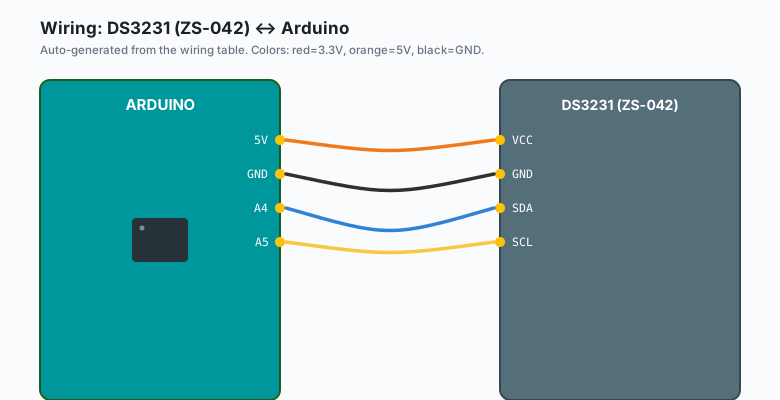
Two buses, no conflicts: the DS3231 talks I2C, the SD card talks SPI. Both can share the Arduino.
| DS3231 (ZS-042) | Arduino |
|---|---|
VCC | 5V |
GND | GND |
SDA | A4 |
SCL | A5 |
| SD module | Arduino |
|---|---|
VCC (3.3-5V input) | 5V |
GND | GND |
CS | D10 |
SCK | D13 |
MOSI | D11 |
MISO | D12 |
| LDR divider | Arduino |
|---|---|
| LDR top leg | 5V |
LDR bottom leg + 10k to GND | junction to A0 |
The I2C pins (A4/A5) are fixed on the Uno; the SPI pins (D10-D13) are the hardware SPI peripheral and also fixed. The only free choice here is the CS pin, and D10 is the default the SD library expects.
Install
Arduino IDE >> Sketch >> Include Library >> Manage Libraries >> search “RTClib” >> install the one by Adafruit. This pulls in the BusIO helpers automatically when the IDE asks; let it.
The SD library ships with the IDE (Arduino IDE >> File >> Examples
SD, if it is there, it is installed). No other downloads.
The code
#include <Wire.h>
#include <RTClib.h>
#include <SPI.h>
#include <SD.h>

RTC_DS3231 rtc;
const int CS_PIN = 10;
const int LDR = A0;
File logFile;

void setup() {
  Serial.begin(115200);

  if (!rtc.begin()) {                    // RTC missing or wiring wrong
    Serial.println("RTC not found. Check A4/A5. Halting.");
    while (1) delay(100);
  }
  if (rtc.lostPower()) {
    Serial.println("RTC lost power, setting to compile time.");
    rtc.adjust(DateTime(F(__DATE__), F(__TIME__)));
  }

  if (!SD.begin(CS_PIN)) {
    Serial.println("SD init failed. Is the card in?");
    while (1) delay(100);
  }

  // File named by date; reopens across reboots the same day.
  String name = "/" + dateStamp() + ".csv";
  logFile = SD.open(name, FILE_WRITE);
  logFile.seek(logFile.size());          // append, do not overwrite
  logFile.println("timestamp,light");
  logFile.flush();
}

String dateStamp() {
  DateTime now = rtc.now();
  char buf[11];
  sprintf(buf, "%04d%02d%02d", now.year(), now.month(), now.day());
  return String(buf);
}

void loop() {
  DateTime now = rtc.now();
  int light = analogRead(LDR);

  char line[32];
  sprintf(line, "%02d:%02d:%02d,%d",
          now.hour(), now.minute(), now.second(), light);
  logFile.println(line);
  logFile.flush();                       // write actually lands on card

  Serial.println(line);
  delay(5000);                           // 12 lines per minute is plenty
}
Two lines in this sketch do more work than they look like they do.
rtc.lostPower() detects the coin cell going dead and re-seeds the
clock from the sketch’s compile time, which turns a silent data
corruption problem into a one-line Serial Monitor message. The
flush() after every line forces the data out of the library’s
buffer onto the card, which is the difference between “my logger
lost the last hour” and “my logger lost nothing” when the power
dies mid-session.
(e.g. opening 20260923.csv in Excel or LibreOffice gives you
instantly sortable columns; the format is deliberately boring.)
Formatting the card (the step everyone skips)
The SD library reads FAT16/FAT32. Cards bigger than 32 GB arrive formatted exFAT, which the stock library cannot read. Format any card in Arduino IDE >> (your OS) >> File Explorer / Finder >> right-click the card >> Format >> FAT32 before the first run. Cards from no-name brands fail at exactly the moment you have the most irreplaceable data on them; SanDisk or Kingston, small capacity, boring and correct.
What you learned
- Timestamping is a hardware job: an RTC with its own battery is the only version of time on an Arduino that survives reality (power cuts, reboots, and code redeploys).
- SPI and I2C share a board happily because they are different buses; this project is the reference wiring for “two buses at once”.
flush()is the durability line in file writes; buffered data is data you can lose.
When something breaks
- “SD init failed” every time: card not FAT32, CS pin wrong, or the module is a bare 3.3V-only board without a regulator fed 5V. Reformat FAT32, confirm CS is D10, check the module type.
- Timestamps are all 2000-01-01 00:00: the RTC lost power and
this sketch is not the one that re-seeded it. Run any RTClib
example with
rtc.adjust(DateTime(F(__DATE__), F(__TIME__)))once, then redeploy the logger. Also check the CR2032 coin cell. - Card writes a few hours then stops: cheap card + no flush.
Cards cache aggressively; without
flush()the OS-visible file lags minutes behind what the sketch thinks it wrote. Keep the flush, use a name-brand card. - File opens with garbage lines: you wrote to two files (one left open from a previous crash). Unplug the Arduino, take the card to a computer, delete the junk, reinsert, restart. The sketch opens by date name, so the same-day file appends cleanly.
- RTC reads fine but drifts minutes per week: that is the DS3231’s dead-battery warning behavior, not drift. Replace the coin cell (measure it: under 2.8V is dying) and the module returns to its 2-ppm self.
What to build next
- The DS3231 RTC alarms tutorial makes this logger wake on a
schedule instead of a
delay(), which is the battery-powered version of the same build. - The HX711 load cell scale tutorial feeds real weight data into this exact CSV pattern: a grain-hop or beehive scale with history.
- The Pico microSD datalogger tutorial is the same idea on the Pico in MicroPython if you want to compare toolchains.
- The nRF24L01 tutorial adds the radio layer: loggers that talk to a base station instead of waiting for you to swap the card.
The Arduino Robotics book bundles the sensor tutorials (including this one) with the robot builds; the log-everything habit this teaches is the same one the robot chapters use for motor telemetry.