Pico W: serve a live sensor dashboard over Wi-Fi
Read a DHT22 or BME280 and serve a live dashboard from a Pico W. The smallest, cheapest way to put a sensor reading on your phone's browser.
The Pico W plus a DHT22 is the smallest useful sensor dashboard you can build. The chip is $6, the sensor is $2, and you get a live web page that shows the temperature and humidity on any phone or laptop on the same Wi-Fi. No cloud, no app, no MQTT broker.
The pattern is the same as the ESP32 web server tutorial: read the sensor, build a small HTML page with the values, serve it on port 80. The Pico W runs MicroPython, so the code is shorter than the ESP32 version and easier to read.
What you need
- Raspberry Pi Pico W (the W version is required for Wi-Fi)
- DHT22 or BME280 sensor
- 4.7 kohm pull-up resistor (for DHT22, between the data pin and 3.3V)
- MicroPython firmware installed (v1.20+ has Wi-Fi)
- A known Wi-Fi network
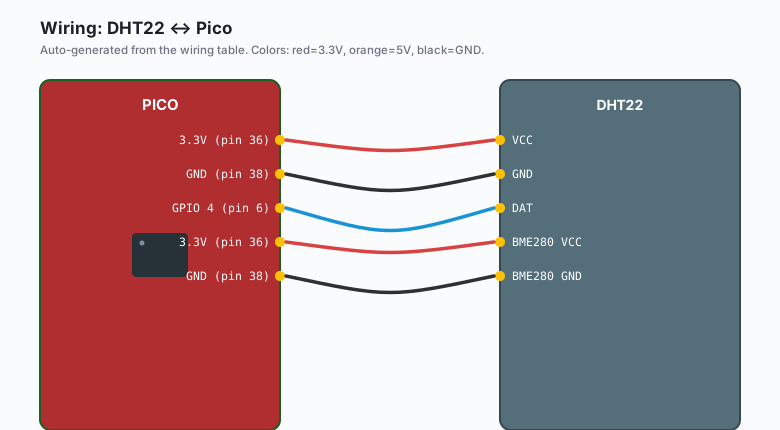
Wiring
DHT22
DHT22 VCC -- Pico 3.3V (pin 36)
DHT22 GND -- Pico GND  (pin 38)
DHT22 DAT -- Pico GPIO 4 (pin 6)
Add a 4.7 kohm pull-up between DAT and 3.3V. The DHT22’s open-drain output needs it.
BME280 (over I2C)
BME280 VCC -- Pico 3.3V (pin 36)
BME280 GND -- Pico GND  (pin 38)
BME280 SDA -- Pico GPIO 0 (pin 1, default I2C0 SDA)
BME280 SCL -- Pico GPIO 1 (pin 2, default I2C0 SCL)
The Pico’s default I2C pins are GPIO 0 and 1. If you have other devices on the I2C bus, the BME280 is address 0x76 (most boards) or 0x77 (if SDO is tied to VCC).
The code (DHT22 version)
Save this as main.py on the Pico W:
import network
import socket
import time
from machine import Pin
import dht
SSID = "your-wifi-ssid"
PASSWORD = "your-wifi-password"
DHT_PIN = 4
sensor = dht.DHT22(Pin(DHT_PIN))
wlan = network.WLAN(network.STA_IF)
wlan.active(True)
wlan.connect(SSID, PASSWORD)
print("Connecting to Wi-Fi", end="")
for _ in range(20):
if wlan.isconnected():
break
print(".", end="")
time.sleep(1)
if not wlan.isconnected():
raise RuntimeError("Wi-Fi failed to connect")
ip = wlan.ifconfig()[0]
print()
print(f"Web server running on http://{ip}")
addr = socket.getaddrinfo(ip, 80)[0][-1]
s = socket.socket()
s.setsockopt(socket.SOL_SOCKET, socket.SO_REUSEADDR, 1)
s.bind(addr)
s.listen(2)
s.settimeout(0.1)
last_read_ms = 0
temp = 0.0
hum = 0.0
def read_sensor():
global temp, hum
try:
sensor.measure()
temp = sensor.temperature()
hum = sensor.humidity()
except OSError as e:
print("Sensor read failed:", e)
def build_page():
return f"""<!DOCTYPE html>
<html><head>
<meta charset='utf-8'>
<meta http-equiv='refresh' content='5'>
<title>Pico W sensor dashboard</title>
<style>
body{{font-family:sans-serif;background:#0f1115;color:#e6e9ef;
display:flex;flex-direction:column;align-items:center;padding:2rem;}}
.card{{background:#161a22;padding:1.5rem 2rem;margin:0.5rem;border-radius:6px;
min-width:220px;text-align:center;}}
.value{{font-size:2.5rem;color:#4ea1ff;}}
</style></head><body>
<h1>Pico W sensor dashboard</h1>
<div class='card'><div class='value'>{temp:.1f} °C</div><div>temperature</div></div>
<div class='card'><div class='value'>{hum:.1f} %</div><div>humidity</div></div>
</body></html>"""
while True:
# Update sensor reading every 2 seconds
now = time.ticks_ms()
if time.ticks_diff(now, last_read_ms) >= 2000:
read_sensor()
last_read_ms = now
# Accept any pending client
try:
cl, client_addr = s.accept()
except OSError:
continue
try:
req = cl.recv(1024).decode("utf-8")
# Ignore the request body; we always return the same page
cl.send("HTTP/1.0 200 OK\r\nContent-Type: text/html\r\n\r\n")
cl.send(build_page())
except OSError as e:
print("Request error:", e)
finally:
cl.close()The pattern is the same as the basic Pico W web server, with two
additions: a non-blocking sensor read every 2 seconds, and a
<meta http-equiv='refresh' content='5'> tag in the HTML that
reloads the page every 5 seconds.
The code (BME280 version)
If you have a BME280 instead, the only changes are the import and the read function:
from machine import I2C, Pin
import bme280

i2c = I2C(0, scl=Pin(1), sda=Pin(0), freq=100_000)
sensor = bme280.BME280(i2c=i2c)

def read_sensor():
    global temp, hum, press
    t, p, h = sensor.read_compensated_data()
    temp = t / 100.0
    press = p / 25600.0
    hum = h / 1024.0
The BME280 needs the bme280 library installed first. Save
bme280.py from
https://github.com/micropython-IMUFUSION/micropython-bme280 to the
Pico W’s filesystem, or install via mip:
import mip
mip.install("bme280")
Why the meta refresh, not WebSockets
The HTML page uses <meta http-equiv='refresh' content='5'> to
reload every 5 seconds. That works on every browser, with no
JavaScript. The cost is a full page reload every 5 seconds, which
uses ~3 KB of data per reload.
For smoother updates, the WebSocket version sends just the new sensor values every 5 seconds. That is a separate tutorial. The meta-refresh version is what I ship to clients who need “is the sensor up” without learning WebSockets.
What the page looks like
Open http://<pico-ip>/ in a browser. You see a dark page with two
big cards: “22.5 C” and “45.2 %”. Every 5 seconds the page reloads
and the numbers update. On a phone, it looks the same. On a
laptop, it looks the same. No app, no login, no cloud account.
The IP address prints to the REPL on boot. Save that to a sticky note, or set a static DHCP lease for the Pico W’s MAC address in your router (this is the right move for a permanent install).
The request handling detail
cl.recv(1024) reads up to 1024 bytes of the HTTP request. For
the page reload that the browser sends, that is enough. The full
HTTP request line for a browser reload looks like:
GET / HTTP/1.1
Host: 192.168.1.42
...
We do not parse it. We just send the same HTML back. The browser ignores the URL and renders the page.
This is fine for a read-only dashboard. If you want to add controls (buttons, sliders, form submission), the request URL and method matter. See the Pico W web server tutorial for the URL-parsing version.
Avoiding the “client already connected” error
A common bug: the Pico W serves one page, then a few seconds later
the browser tries to reconnect and the socket is still in CLOSE_WAIT.
The fix is setsockopt(SOL_SOCKET, SO_REUSEADDR, 1) and a
finally: cl.close() in the request handler.
If you still see the error, lower the listen backlog:
s.listen(2) # accept at most 2 queued connectionsFor a dashboard that one person views, listen(2) is plenty.
Power consumption
The Pico W draws about 30 mA active (Wi-Fi connected, no sensor read) and 1.3 mA in deep sleep. The DHT22 draws about 1.5 mA when sampling. For a battery-powered sensor that refreshes every 5 seconds, average current is about 35 mA active for 200 ms every 5 seconds, plus the deep sleep baseline. That is:
0.04 * 35 mA + 0.96 * 1.3 mA = 2.65 mA averageA 2000 mAh 18650 cell gives about 2000/2.65 = 750 hours = 31 days. For longer life, refresh less often, or use a hardware timer to cut the whole board’s power.
What you learned
- The Pico W can read a sensor and serve a web page from the same chip.
<meta http-equiv='refresh'>is the no-JavaScript way to auto- reload.- The HTTP request handling is “accept, recv, send, close” in a loop, with a non-blocking sensor read on the side.
- A 2000 mAh battery gives about a month of life for a 5-second refresh.
When something breaks
- The page loads but shows 0.0 for everything. Sensor read is
failing. Check the wiring. For DHT22, the most common bug is
missing pull-up resistor. For BME280, the most common bug is
wrong I2C address (run
i2c.scan()and update). - Browser says “site took too long to respond”. The Pico W’s Wi-Fi is not connected. Watch the REPL for the IP address; if you see “Wi-Fi failed to connect” on boot, fix the SSID and password.
- Page loads but is missing styles. The browser cached the old page. Hard reload (Ctrl+Shift+R or Cmd+Shift+R).
OSError: [Errno 98] EADDRINUSEon boot. The Pico W did not release the socket from the last boot. Adds.setsockopt(socket.SOL_SOCKET, socket.SO_REUSEADDR, 1)and the listen line. Or pull the power for 10 seconds.- Numbers update slowly. The DHT22 has a 2-second minimum between reads. Faster than that and the sensor returns the previous value. Use the BME280 if you need 10 Hz updates.
What to build next
- The Pico W MQTT publish tutorial pushes the same readings to a broker instead of serving a web page.
- The Pico W web server tutorial is the simpler version (LED on/off, no sensor).
- The book Pico Wi-Fi Projects covers the WebSocket version of this, which sends just the new values every 5 seconds without a full page reload.