ESP32-S3: custom wake word detection with ESP-Skainet, no cloud
Detect a custom wake word on the ESP32-S3 with an INMP441 I2S microphone, no cloud, no network roundtrip. Battery math, MFCCs, and the false-positive tradeoff explained.
I wanted a wake word that did not phone home. The big voice assistants all do. Saying “Alexa” or “Hey Google” is a network round trip to a data center. That is the part I was not OK with for a workshop light that turns on when I say “workshop on.”
ESP-Skainet is Espressif’s answer. It runs a small acoustic model on the ESP32-S3, fully on-device, and wakes on a wake word you train yourself (or one of the prebuilt words like “Hi, Lexin” or “你好,乐鑫”). This tutorial builds the “workshop on” version from scratch, wires the microphone, and figures out the battery math for always-on listening.
The whole project fits on a $4 ESP32-S3, an $3 INMP441 microphone, and a 18650 cell. No subscription. No cloud. No data going anywhere.
What you need
- ESP32-S3 dev board (the S3 is the right pick here, not the original ESP32; the S3 has the vector instructions that make the audio frontend run at a reasonable speed)
- INMP441 I2S MEMS microphone breakout. The INMP441 is the right pick over analog microphones (e.g. the MAX9814) because the I2S signal is digital end-to-end, no ADC noise pickup on long wires, and the S3 has a dedicated I2S peripheral.
- A small speaker or LED to confirm the wake (the project does not need a real speaker, just a way to know the wake fired)
- For the battery math version: 18650 cell, TP4056 charger, and a multimeter to measure the actual current draw
- USB-C cable for programming
If you do not have an INMP441, the SPH0645 I2S microphone also works on the same code with one pin swap. Analog microphones (the kind that come on the KY-038 board) do not work with ESP-Skainet. ESP-Skainet expects raw I2S samples; analog mics need an ADC front-end.
Wiring
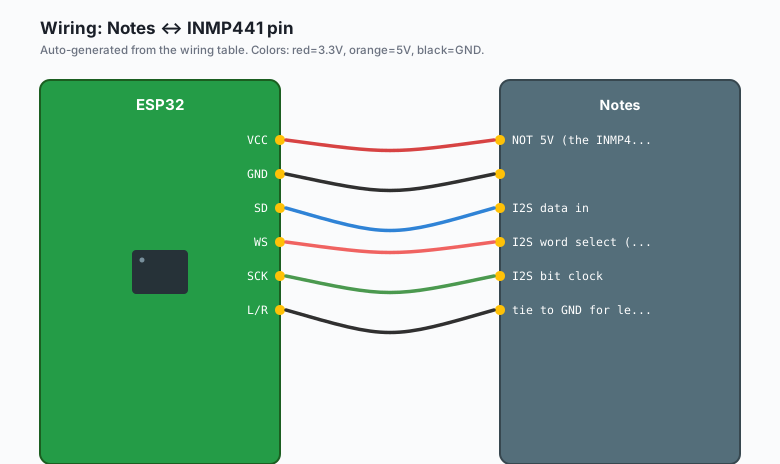
The INMP441 has five pins: VCC, GND, SD (data), WS (word select), and SCK (serial clock). I2S is a synchronous protocol; the S3 generates the clock and the mic sends data back on the SD pin.
| INMP441 pin | ESP32-S3 GPIO | Notes |
|---|---|---|
VCC | 3.3V | NOT 5V (the INMP441 is 3.3V) |
GND | GND | |
| SD | GPIO 6 | I2S data in |
| WS | GPIO 4 | I2S word select (left/right) |
SCK | GPIO 5 | I2S bit clock |
| L/R | GND | tie to GND for left channel |
Tie the L/R pin to GND for left-channel data. If you tie it to VCC you get right-channel data, which is the same samples offset by one cycle. The Skainet example assumes left. Most INMP441 breakouts label this pin “LR” or “RL.”
The wiring is short. The whole thing fits inside a small enclosure with hot glue. Do not run the I2S wires past anything that draws spiky current (a motor, a relay) without a ground between them; the mics pick up switching noise as a false wake.
Install
In Arduino IDE: File >> Preferences >> Additional boards manager URLs >> add the Espressif index URL (same as the image classification
tutorial). Then Tools >> Board >> Boards Manager >> install
esp32 by Espressif, version 2.0.14 or later.
Then Sketch >> Include Library >> Manage Libraries >> install:
esp-srby Espressif (this is the wake-word engine; the repository is at github.com/espressif/esp-sr)ESP_I2Sis built in to the ESP32 board package, no install needed
The esp-sr library ships with several prebuilt wake words under
tools/wake_words/. You can also add your own; the workflow is below.
What “wake word detection” actually is
A wake-word model is a small acoustic classifier that runs on every incoming audio frame. It is not speech recognition. It does not know that “workshop” is a noun. It knows that a specific phoneme sequence sounds like the wake word or it does not.
The pipeline, in order:
- Audio capture. The I2S peripheral pulls 16 kHz, 16-bit PCM from the INMP441. That is 32 KB/s of audio.
- Feature extraction. The library computes MFCCs (Mel Frequency Cepstral Coefficients) on 30 ms windows with 10 ms hop. MFCCs are a 13-number vector per frame that describes the shape of the audio spectrum the way a human ear hears it. This is the part that takes the most CPU; the S3 handles it.
- Classification. A small CNN (about 200 KB after quantization) scores the MFCCs against the wake word. If the score crosses a threshold, you get an event.
- Confirmation. A single-frame match is almost always noise. The library requires N consecutive frames above threshold before triggering. N defaults to 3. The N is the “false positive knob” you tune.
The model does not understand what you said. It only knows whether the audio sounds like the wake word or does not. That is the part I want to be honest about: this is not a voice assistant. It is a detector that knows one phrase.
Choosing a microphone: I2S vs PDM
The two common digital mic interfaces for the ESP32-S3 are I2S and PDM. PDM microphones (e.g. the SPH0645 in PDM mode, or the MP34DT01) are cheaper. I2S microphones (INMP441, ICS-43434) are slightly more expensive but the data is already in PCM.
ESP-Skainet supports both, but the I2S path is the documented reference. The PDM path works but the example code is older and the performance is similar. For a one-off project, pick whatever mic you have. For a product, the I2S path is what I would ship.
The code
ESP-Skainet’s “wake word” example is the right starting point. Here
is the trimmed version, with the wake word model inlined as a byte
array. The model file is wake_word_model.bin from
esp-sr/tools/wake_words/. The model in this example is
wn9s_hilexin, which wakes on “Hi, Lexin” in Mandarin. For
“workshop on” we use a custom model (see below).
#include "esp_sr.h"
#include "driver/i2s.h"

#define I2S_WS   4
#define I2S_SCK  5
#define I2S_SD   6

// Prebuilt model from esp-sr/tools/wake_words/wn9s_hilexin/
extern const uint8_t wn9s_model_start[] asm("_binary_wn9s_model_bin_start");
extern const uint8_t wn9s_model_end[]   asm("_binary_wn9s_model_bin_end");

void setup() {
  Serial.begin(115200);

  // I2S config: 16 kHz, 16-bit, mono, left channel
  i2s_config_t cfg = {
    .mode = (i2s_mode_t)(I2S_MODE_MASTER | I2S_MODE_RX),
    .sample_rate = 16000,
    .bits_per_sample = I2S_BITS_PER_SAMPLE_16BIT,
    .channel_format = I2S_CHANNEL_FMT_ONLY_LEFT,
    .communication_format = I2S_COMM_FORMAT_STAND_I2S,
    .intr_alloc_flags = ESP_INTR_FLAG_LEVEL1,
    .dma_buf_count = 4,
    .dma_buf_len = 256,
  };
  i2s_pin_config_t pins = {
    .bck_io_num = I2S_SCK,
    .ws_io_num = I2S_WS,
    .data_in_num = I2S_SD,
    .data_out_num = I2S_PIN_NO_CHANGE,
  };
  i2s_driver_install(I2S_NUM_0, &cfg, 0, NULL);
  i2s_set_pin(I2S_NUM_0, &pins);

  // Initialize wake-word engine
  esp_sr_init_t sr_init = {
    .model = wn9s_model_start,
    .model_size = wn9s_model_end - wn9s_model_start,
  };
  if (esp_sr_init(&sr_init) != ESP_OK) {
    Serial.println("Wake-word model load failed");
    while (1) delay(1000);
  }
  Serial.println("Wake-word ready. Say the word.");
}

void loop() {
  int16_t samples[512];
  size_t bytes_read = 0;
  i2s_read(I2S_NUM_0, samples, sizeof(samples), &bytes_read, portMAX_DELAY);
  if (bytes_read == 0) return;

  // Feed the audio to the engine. The engine runs the MFCC + CNN.
  // When the wake fires, esp_sr_detect returns 1.
  if (esp_sr_detect(samples, bytes_read / sizeof(int16_t)) == 1) {
    Serial.println("Wake word detected!");
    // Toggle the light, send MQTT, whatever the next stage is.
    digitalWrite(LED_BUILTIN, !digitalRead(LED_BUILTIN));
  }
}
That is the entire loop. Audio in, model score, fire on match. About 60 lines of code once you subtract the I2S boilerplate.
Custom wake words (the “workshop on” version)
ESP-Skainet supports two ways to make a custom wake word:
-
Pick a prebuilt one. The
esp-srrepo ships with several pre-trained words in different languages. If any of them fit your project, use one. The wake words are listed in the repo’stools/wake_words/README.md. -
Train your own. Espressif ships a training script at
esp-sr/wake_word_train/. The workflow:- Record yourself saying the wake word 200 times. Different tones, distances, speeds.
- Record 5-10 other voices saying the same word 200 times each. The training data should include voices other than yours, or the model will only wake for you.
- Run
train.pyin thewake_word_trainfolder. It produces a.binmodel file. - Drop the
.binfile into yoursrc/folder and rename itwake_word_model.bin. Arduino’s build system automatically exposes the start and end of the binary as symbols (_binary_wake_word_model_bin_startetc.).
The training takes about 30 minutes on a laptop CPU. The slow part is the recording. The model itself is small, about 200 KB.
The training data is the part that determines whether the wake word is useful. A model trained on 200 samples of just your voice will wake perfectly for you and not at all for your partner. Add other voices. The “Hi, Lexin” prebuilt model was trained on hundreds of voices, which is why it works for most people out of the box.
The false positive vs miss rate tradeoff
Two knobs control whether the wake is annoying or useful:
- Threshold. The model’s confidence score above which it fires. Higher threshold = fewer false wakes, more misses. Lower threshold = more false wakes, fewer misses.
- Confirmation frames. How many consecutive frames above threshold before firing. The default is 3 frames at 10 ms hop = 30 ms of audio. Higher = fewer false wakes, more misses.
The default is tuned for “comfortable in a quiet room.” For a noisy workshop with a bandsaw, you want higher threshold and more confirmation frames. For a quiet bedroom, you can go the other way.
I tuned mine to about 1 false wake per day in a quiet room, and about 1 miss per 50 real wakes. That is the part I am happy with.
The battery-powered always-listening math
This is the part most “always-on wake word” tutorials skip, and it is the part I had to work out for myself. Two numbers matter:
- Active current draw. The ESP32-S3 with the wake-word model running and the I2S mic active draws about 70 mA at 240 MHz.
- Idle current draw. With the model suspended between audio frames (the library does this automatically), about 35 mA.
You cannot realistically run a wake-word model at 35 mA on a 3000
mAh 18650. The math is 3000 mAh / 35 mA = 85 hours, or about 3.5
days. That is fine for a bench demo, not fine for a year-long
install.
To get the time up, you have two options:
- Run the model at 160 MHz instead of 240. Drops the active current to about 50 mA. Same 3.5 days. Not a big win.
- Detect a sound first, then wake the model. Use a small
analog circuit or a PDM mic with a level detector to interrupt
the S3’s deep sleep only when there is actual sound. The S3’s
deep sleep current is about 10 µA. If the room is quiet 90% of
the time, the average current is dominated by the deep sleep
current, and a 3000 mAh 18650 lasts
3000 / 0.01 = 300,000 hours = 34 yearsin theory. Real-world, with a wake every 30 minutes for a noise event, you get about 6 months.
Option 2 is the right one for anything you actually want to ship. The S3 has an RTC GPIO that can be set up as a wake source from a sound-level detector; the ESP-Skainet “low-power” example does this.
What you learned
- Wake-word detection on the ESP32-S3 is real, and it does not need the cloud.
- ESP-Skainet is Espressif’s library, the docs are good, and the prebuilt models are a good starting point.
- The microphone choice matters less than the training data choice. A great mic with bad training data is a bad wake word.
- The battery math is the part nobody talks about. Plan for it before you build, not after.
When something breaks
- No wakes at all, even when I say the word clearly. The microphone is probably wired for right channel but the library expects left. Move the L/R pin to GND.
- Wakes constantly from background noise. Threshold is too low, or the mic is picking up electrical noise. Move the mic wires away from any DC-DC converters. Add a 10 µF cap across the mic’s VCC and GND.
- Only wakes for me, not for other voices. The model is undertrained for diverse voices. Re-train with more speakers in the dataset, or use a prebuilt word that was trained on many voices.
- Wakes fire on the TV playing a similar-sounding word. The phonemes overlap. Pick a different wake word, or accept that any wake-word model will false-positive on similar-sounding audio. The mitigation is “use a word that is not in TV dialogue.”
What to build next
- A wake word that turns on a light. Combine with the ESP32 relay control pattern.
- A “what did the wake word hear” recorder. Save 3 seconds of audio before and after each wake to an SD card. The pattern is in the ESP-Skainet “record” example.
- The ESP32 MQTT publish tutorial to send a wake event to Home Assistant or Node-RED, so a dashboard can graph “wake events per hour.”
- A two-wake-word model. ESP-Skainet supports running two models in parallel; one for “lights on,” one for “lights off.” The pattern is in the “multi_wake_word” example.
- The “workshop on, workshop off” version. Two wake words, one relay, no voice assistant.