ESP32-H2: set up a Thread border router, the foundation of Matter-over-Thread
Build a custom Thread border router on an ESP32-H2 so Matter-over-Thread devices can reach your home network. OpenThread vs Matter-over-Thread, the one-router-per-home rule, and why Thread is not for cameras.
A Thread border router is the thing that connects Thread devices to the rest of your network. Without one, your Thread devices (e.g. a Matter-over-Thread light bulb, a Thread sensor) cannot talk to your phone, your Apple Home, your Google Home, or the internet. The border router is the gateway between the Thread mesh and your Wi-Fi or Ethernet network. If you do not have one, the Thread devices are off the grid.
I built a custom border router on an ESP32-H2 because I wanted to see how it stacked up against the Apple HomePod mini and the Google Nest Hub, which both ship with built-in Thread border routers. The short answer: the commercial border routers are easier and the ESP32-H2 is for when you want a custom one (e.g. you want a Thread network that does not depend on a vendor’s cloud, or you want to run a Thread mesh in a part of the house where you do not have a HomePod or Nest Hub).
This is an advanced tutorial. You need an ESP32-H2 specifically. The regular ESP32, ESP32-S3, and ESP32-C3 do not have the 802.15.4 radio that Thread runs on. The ESP32-H2 does. If you bought an “ESP32” off Amazon, it is almost certainly not the H2. Look at the part number on the module. ESP32-H2 dev boards are labeled “ESP32-H2-DevKitM-1” or similar.
What Thread is, in one paragraph
Thread is a low-power mesh networking protocol for smart-home devices. It is not Wi-Fi (no high bandwidth, no video, no audio). It is not Zigbee (different protocol stack, IP-native). Thread is built on 802.15.4, the same radio layer Zigbee uses, but the network layer is 6LoWPAN and IPv6. Every Thread device has an IPv6 address. That is the part that makes Matter-over-Thread work: Matter is an IPv6 protocol, so Matter-over-Thread is just Matter running on a Thread network, with the border router providing the IPv6 reachability to the rest of the home.
The mesh is the other key part. Thread devices relay each other’s traffic. A battery-powered sensor at the far end of the house does not need to be within radio range of the border router. It just needs to be within range of some other Thread device. The mesh heals itself when devices drop off. The border router is one of the nodes in the mesh, but it is the one that also has a connection to the Wi-Fi or Ethernet network.
ESP32-H2 vs ESP32, and why the H2 is different
The regular ESP32 (and S3, C3, C6) have Wi-Fi and Bluetooth. The ESP32-H2 has Bluetooth and an 802.15.4 radio, but no Wi-Fi. That is the tradeoff: if you need Wi-Fi, you use a regular ESP32 and run Matter over Wi-Fi (the previous tutorial). If you need Thread, you use the H2 and run Matter over Thread (this tutorial). There is no single ESP32 that has both Wi-Fi and an 802.15.4 radio in production today. The ESP32-C5 and C61 are the parts Espressif has been promising with both, but the Matter-over-Thread stack on them is still maturing. For production today, H2 for Thread, regular ESP32 for Wi-Fi.
The 802.15.4 radio is what makes the H2 interesting. It is the same physical layer Zigbee uses, and Thread is one of the protocol stacks that runs on top of 802.15.4. Other stacks on the same radio include Zigbee and Matter-over-Thread. The radio does not know or care which stack is running on it. The firmware picks the stack.
The border router role
A Thread border router has three jobs:
- It runs the Thread mesh (i.e. it is a Thread router, the kind of node that relays traffic for other nodes)
- It is the gateway that connects the Thread mesh to the Wi-Fi or Ethernet network
- It provides DHCPv6 and prefix delegation for Thread devices, so Thread devices can reach the wider network
Without those three jobs, you do not have a border router. You have a Thread node, or a Thread router, or a Thread leader, but not a border router. A border router is a specific role. Most Thread border routers are also Thread leaders (the elected coordinator of the mesh), but the leader role and the border router role are separate.
The Apple HomePod mini, the Google Nest Hub, the Amazon Echo (4th gen), and the Apple TV 4K all ship as Thread border routers. The Home Assistant SkyConnect and the SMLIGHT SLZB-06 are popular third-party border routers. The ESP32-H2 running esp-thread-br is a DIY option.
OpenThread vs Matter-over-Thread
This is the distinction that confused me for a while. There are two stacks here, and they are different things.
OpenThread is Google’s open-source implementation of the Thread protocol. It is the network layer. It handles mesh routing, 6LoWPAN, IPv6, the Thread leader election, and the border router role. OpenThread is what makes a Thread network exist. You can run OpenThread on an ESP32-H2 without any Matter at all. The result is a Thread network with no application protocol on top of it.
Matter-over-Thread is Matter running on top of Thread. It assumes a Thread network exists and uses that network as the IP transport. To build a Matter-over-Thread device, you need a Thread border router on the network (e.g. your ESP32-H2 running OpenThread in border router mode) and you need a Matter device on the network (e.g. a Matter-over-Thread light bulb, or another ESP32-H2 running the Matter stack on top of OpenThread).
The relationship is layered. Thread is the network. Matter is the application. You can have Thread without Matter (no smart-home devices, just the mesh). You cannot have Matter-over-Thread without Thread (no network for Matter to run on). For this tutorial, we are building the border router, which is the network side.
The commissioning flow, and why a Thread network has its own QR code
When you pair a Matter-over-Thread device, the commissioner (your phone) does not provision Wi-Fi credentials. Thread does not use Wi-Fi. The commissioner instead provisions the Thread network credentials (the network key, the PAN ID, the channel, the mesh-local prefix). The Thread border router is the source of those credentials. When the commissioner hands the device the credentials, the device joins the Thread mesh that the border router is running.
This means the commissioning flow for a Matter-over-Thread device assumes a border router is already on the network. The phone talks to the border router (e.g. over Wi-Fi or Bluetooth), the border router provides the Thread credentials, and the device joins the Thread mesh. The phone never talks to the Thread device directly during commissioning. The phone talks to the border router, the border router talks to the Thread device.
The QR code is the same as before. It is a Matter setup payload, not a Thread setup payload. The Thread credentials are not in the QR code. They are in the border router.
The “one border router per home” rule
You do not need one border router per device. You need one border router per home. The Thread mesh is a single network, and the border router is the gateway. If you have two border routers in the same home, they can either form a single mesh (one is the leader, the other is a router) or form two separate Thread networks (if the network keys are different). Two separate networks means your Thread devices have to be commissioned to whichever network their border router is on, and the phone’s app has to know which network to talk to.
In practice, most homes have exactly one border router (e.g. a HomePod mini, a Nest Hub, or one ESP32-H2 running esp-thread-br). Some homes have two or three (e.g. an Apple HomePod mini plus a Home Assistant SkyConnect) and the two border routers join the same mesh. This works, but you have to be careful about which one is elected leader, because the leader is the one that hands out prefixes.
If you are building an ESP32-H2 border router, the most common reason is that you do not have a HomePod or Nest Hub and you do not want to buy one. The ESP32-H2 is a fine border router. It is just a more involved setup.
Apple HomePod mini and Google Nest Hub as alternative border routers
If you already have an Apple HomePod mini, an Apple TV 4K, a Google Nest Hub, an Amazon Echo (4th gen), or a recent SmartThings Hub, you almost certainly do not need an ESP32-H2 border router. The built-in border router on those devices is fine for a typical home. The reason to build a custom one is one of:
- You do not have any of the above and you do not want to buy one.
- You want a Thread network that is independent of any vendor’s cloud (the built-in border routers all have vendor-specific management on top, even if the protocol is open).
- You are running Home Assistant in a way that the built-in border routers do not work with (e.g. you want a Thread network that is reachable from Home Assistant but not from Apple Home, which is an unusual setup but possible).
- You want to learn how Thread works.
If your reason is 1, 2, or 4, this tutorial is for you. If your reason is 3, you probably want a SMLIGHT or a SkyConnect, not an ESP32-H2.
Wiring
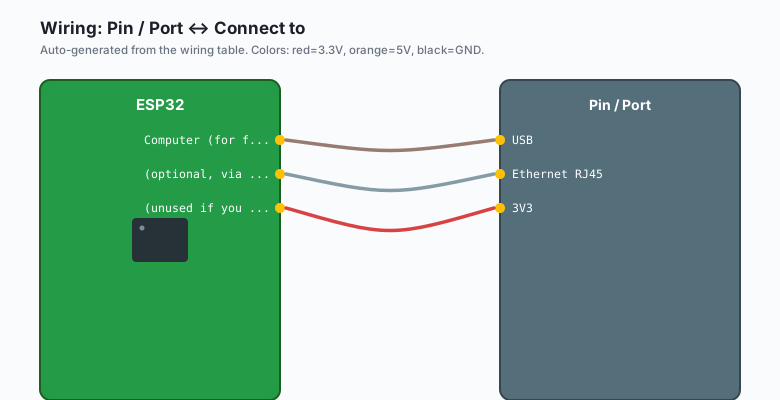
The ESP32-H2-DevKitM-1 needs three wires to your Wi-Fi network. It needs USB for power and programming, and it needs an Ethernet or Wi-Fi uplink to your home network.
| Pin / Port | Connect to |
|---|---|
| USB | Computer (for flashing) |
| Ethernet RJ45 | (optional, via the W5500 module) |
| 3V3 | (unused if you use the W5500 + Ethernet) |
If you do not have Ethernet, you can run the border router in “Wi-Fi backhaul” mode using an ESP32-S3 as a co-processor that joins your Wi-Fi and forwards traffic to the H2 over SPI. This is supported by
esp-thread-brbut adds a fair bit of complexity. For the first build, use Ethernet.
Install
This uses the esp-idf toolchain (not Arduino). The Matter and OpenThread stacks are not in the Arduino library manager. You will need:
esp-idfv5.1 or lateresp-matter(Espressif’s Matter SDK)esp-thread-br(Espressif’s border router reference)
git clone --recursive https://github.com/espressif/esp-thread-br.git
cd esp-thread-br/examples/basic_thread_border_router
idf.py set-target esp32h2
idf.py menuconfig   # configure the Ethernet/Wi-Fi backhaul and the Thread network key
idf.py flash monitor
menuconfig is where the action is. You will set the Thread network key (16 bytes, hex), the PAN ID, the channel (11 to 26, pick one your neighbors are not on), the mesh-local prefix, and the backhaul interface (Ethernet or Wi-Fi via the S3 co-processor).
The code
The border router firmware is mostly configuration. The actual main.c is short.
#include <esp_log.h>
#include <esp_netif.h>
#include <esp_event.h>
#include <esp_thread_br.h>

static const char *TAG = "br";

void app_main(void)
{
    ESP_ERROR_CHECK(esp_netif_init());
    ESP_ERROR_CHECK(esp_event_loop_create_default());

    esp_thread_br_init_config_t br_config = {
        .stack_config = NULL,                 // use menuconfig
        .backhaul_netif = "eth",             // or "sta" for Wi-Fi
        .backhaul_init_fn = NULL,
    };

    ESP_ERROR_CHECK(esp_thread_br_init(&br_config));
    ESP_ERROR_CHECK(esp_thread_br_enable());

    ESP_LOGI(TAG, "Thread border router started");
    ESP_LOGI(TAG, "Network key: %s", esp_thread_br_get_network_key());
    ESP_LOGI(TAG, "PAN ID: 0x%04x", esp_thread_br_get_panid());
    ESP_LOGI(TAG, "Channel: %d", esp_thread_br_get_channel());
}
After idf.py flash monitor, the serial output will show the Thread network key, the PAN ID, the channel, and the mesh-local prefix. These are the credentials a commissioner will hand to a Matter-over-Thread device during commissioning. Save them somewhere. You will need them if you ever want to add a device manually (e.g. without the QR code flow).
Verify the mesh
The simplest verification is the thread CLI in the esp-idf monitor.
thread> state
router
thread> leaderdata
Leader Data: { ... }
thread> childtable
Child Table:
   0 0xabcd RLOC16: 0x0001
   1 0x1234 RLOC16: 0x0002
router is the role (the border router is a router, not a child or end device). childtable lists the Thread devices that have joined the mesh. Once you have a device on the mesh, you can commission it with Apple Home or Google Home and the device will appear in the app.
Limitations
Thread is a low-bandwidth protocol. The 802.15.4 radio gives you 250 kbps of useful throughput, and a real-world Thread mesh delivers about 50 kbps end-to-end. That is fine for sensors, lights, locks, thermostats, and switches. It is not fine for cameras, video doorbells, or anything that needs to stream. Cameras go on Wi-Fi. Thread is for the small, low-power, always-on stuff.
The other limit is the mesh size. A Thread mesh supports up to 512 devices in the spec, but real-world meshes with battery-powered devices rarely exceed 30 or 40. The mesh holds up well at that size. If you are building a commercial-grade Thread deployment with 100+ devices, you want a tested border router like the SMLIGHT or the SkyConnect, not an ESP32-H2.
The third limit is range. 802.15.4 is a short-range radio. The mesh extends it (devices relay each other), but the first-hop range from the border router is the constraint. If your device cannot see the border router, it needs to see another Thread device that can. Plan your Thread device placement accordingly.
When something breaks
- The border router is up but devices cannot join: the network key in the commissioner does not match the border router’s key. Re-check the QR code or the manually-entered setup payload.
- Devices join the mesh but Apple Home says “offline”: the border router is not providing the IPv6 reachability for the Thread mesh. Check that the backhaul interface (eth or sta) is up and has a route to the Wi-Fi/Ethernet network.
thread> statereturnsdetached: the border router cannot find the Thread network it was configured to join. Confirm the channel and PAN ID match between the border router and the devices.- The mesh is up but no devices can reach the internet: the prefix delegation is misconfigured. Confirm
mesh_local_prefixandprefix_listinmenuconfig. - The H2 overheats: the radio is in continuous receive mode and the dev board does not have great thermal dissipation. Add a heatsink or reduce the transmit power in
menuconfig.
What to build next
A Matter-over-Thread light or sensor is the next step. The same esp-matter SDK from the Wi-Fi tutorial works on Thread, except the network interface is Thread instead of Wi-Fi. The data model is the same. The QR code flow is the same. The cluster code is the same. The only thing that changes is the commissioning step (Thread credentials instead of Wi-Fi credentials) and the network interface. After that, a multi-endpoint combination sensor (temperature + humidity + pressure) on the same mesh, with Home Assistant aggregating the data. That is the build I am running on my own bench.