ESP32: LoRa to MQTT gateway, one-channel bridge from off-grid to Wi-Fi
Build a single ESP32 + SX1278 LoRa gateway that bridges off-grid LoRa packets to your home Wi-Fi MQTT broker. Sender subscribes, receiver publishes, one channel only, and a real gateway disclosure.
I built a one-channel LoRa to MQTT gateway because I had a sensor node in the shed that ran on solar and reported temperature over LoRa, and I wanted the readings to land in Node-RED so I could chart them on a dashboard. The gateway is one ESP32 with a SX1278 on it, sitting in a window, listening on a single frequency. When a packet comes in, the gateway republishes it to MQTT. When MQTT gets a message on the command topic, the gateway sends it back out over LoRa. That is the whole job.
The trap I want to be honest about is what “gateway” means here. This is not a LoRaWAN gateway. A LoRaWAN gateway listens on eight channels simultaneously, decrypts packets with per-device session keys, deduplicates across the network, and forwards everything to a network server (e.g. The Things Network). What we are building listens on one frequency, with no encryption, no deduplication, no roaming. It is a bridge, not a gateway. The disclosure is in the title of the tutorial, and it is worth repeating in the body.
This tutorial is ESP32 only. The Sandeep Mistry LoRa library is chip-specific to the Semtech SX127x family. The MQTT library (PubSubClient) is chip-agnostic but the Wi-Fi stack is ESP32-specific (uses the WiFi.h library that ships with the ESP32 Arduino core). A Pico W version would swap Wi-Fi for the Pico’s WiFi library but keep the rest the same.
What a LoRa to MQTT bridge does
The bridge is a translator between two networks. On one side, a LoRa network with tiny packets at 50 kbps or less. On the other side, a Wi-Fi network with TCP/IP and a 1 Gbps connection to the internet. The bridge listens on the LoRa side, and whenever a packet comes in, it republishes the payload to a Wi-Fi MQTT broker. The bridge also subscribes to a command topic on MQTT, and whenever a message arrives, it sends it out over LoRa.
The reason this is useful is that your off-grid sensor nodes do not need to know about Wi-Fi or MQTT. They send LoRa packets into the air. The gateway handles the rest. Your dashboard subscribes to MQTT and gets the data. Your home automation can publish to the command topic and reach the sensor nodes. The gateway is the only thing that touches both networks.
What you need
- 1x ESP32 dev board (ESP32-DevKitC v4 is fine)
- 1x SX1278 LoRa module (RA-02 form factor, $3)
- USB cable for programming
- A 2.4 GHz Wi-Fi network with an MQTT broker reachable from the ESP32. Mosquitto on a Raspberry Pi on the same network is the easy setup.
- (Optional but useful) A second ESP32 + SX1278 pair running the peer-to-peer tutorial, so you have something to send packets.
If you already have the peer-to-peer tutorial working, you have one of the two boards. Add a third ESP32 with a LoRa module for the gateway, and you can have the sensor node send to the peer-to-peer receiver OR to the gateway. The two receivers cannot listen on the same frequency at the same time, so the demo is “the sensor talks to whichever receiver is on.”
Wiring
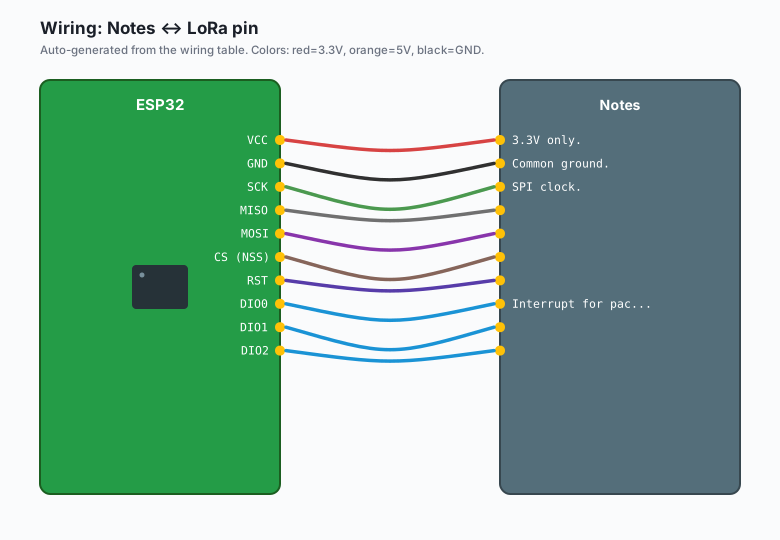
Same wiring as the peer-to-peer tutorial. The LoRa module uses SPI.
| LoRa pin | ESP32 pin | Notes |
|---|---|---|
VCC | 3V3 | 3.3V only. |
GND | GND | Common ground. |
SCK | GPIO 18 | SPI clock. |
MISO | GPIO 19 | |
MOSI | GPIO 23 | |
CS (NSS) | GPIO 5 | |
RST | GPIO 14 | |
| DIO0 | GPIO 26 | Interrupt for packet received. |
| DIO1 | (unused) | |
| DIO2 | (unused) |
If you are using a Heltec LoRa 32, the LoRa module is on the board already. You only need the USB cable.
Install
You need three libraries:
LoRaby Sandeep Mistry (the same one from the peer-to-peer tutorial)PubSubClientby Nick O’Leary (the standard Arduino MQTT client)- The ESP32 Arduino core (which you already have if you have flashed an ESP32 before)
Install: Sketch >> Include Library >> Manage Libraries >> search “LoRa” >> install. Then search “PubSubClient” >> install. Done.
The receiving flow (LoRa in, MQTT out)
The gateway sets up a callback for when a LoRa packet arrives, parses the payload, and publishes it to an MQTT topic. Here is the receiving half of the firmware:
#include <SPI.h>
#include <LoRa.h>
#include <WiFi.h>
#include <PubSubClient.h>

const char* WIFI_SSID = "your-ssid";
const char* WIFI_PASS = "your-password";
const char* MQTT_HOST = "192.168.1.50";  // your broker's IP
const int   MQTT_PORT = 1883;

const char* MQTT_TOPIC = "lora/in";  // gateway publishes here when a LoRa packet arrives

WiFiClient wifi;
PubSubClient mqtt(wifi);

void onReceive(int packetSize) {
  String payload;
  while (LoRa.available()) {
    payload += (char)LoRa.read();
  }
  int rssi = LoRa.packetRssi();

  // Publish to MQTT as "<rssi>|<payload>"
  char msg[128];
  snprintf(msg, sizeof(msg), "%d|%s", rssi, payload.c_str());

  if (mqtt.connected()) {
    mqtt.publish(MQTT_TOPIC, msg);
    Serial.print("Forwarded: ");
    Serial.println(msg);
  } else {
    Serial.println("MQTT disconnected, packet dropped.");
  }
}

void mqttConnect() {
  while (!mqtt.connected()) {
    Serial.print("Connecting to MQTT... ");
    if (mqtt.connect("lora-gateway")) {
      Serial.println("ok");
    } else {
      Serial.print("failed, rc=");
      Serial.print(mqtt.state());
      delay(2000);
    }
  }
}

void setup() {
  Serial.begin(115200);

  WiFi.begin(WIFI_SSID, WIFI_PASS);
  while (WiFi.status() != WL_CONNECTED) {
    delay(500);
    Serial.print(".");
  }
  Serial.println("\nWiFi connected.");

  mqtt.setServer(MQTT_HOST, MQTT_PORT);
  mqttConnect();

  if (!LoRa.begin(915E6)) {
    Serial.println("LoRa init failed.");
    while (1) { ; }
  }
  LoRa.setSpreadingFactor(7);
  LoRa.setSignalBandwidth(125E3);
  LoRa.onReceive(onReceive);
  LoRa.receive();
}

void loop() {
  if (!mqtt.connected()) mqttConnect();
  mqtt.loop();
  // LoRa receive is interrupt-driven, nothing to poll here.
}
The gateway publishes to lora/in with a payload of <rssi>|<message>. The rssi prefix lets the receiver on the MQTT side see how strong the signal was, which is useful for debugging range. Without the prefix you only get the message and you lose the one bit of useful telemetry LoRa gives you.
The sending flow (MQTT in, LoRa out)
The other half: when a message arrives on MQTT topic lora/out, send it as a LoRa packet. This is the part that lets you send commands to off-grid devices.
void mqttCallback(char* topic, byte* payload, unsigned int length) {
  String msg;
  for (unsigned int i = 0; i < length; i++) msg += (char)payload[i];

  LoRa.beginPacket();
  LoRa.print(msg);
  LoRa.endPacket();

  Serial.print("Sent to LoRa: ");
  Serial.println(msg);
}
Wire it up in setup():
mqtt.setCallback(mqttCallback);
mqtt.subscribe("lora/out");
Now when something publishes to lora/out, the gateway forwards it as a LoRa broadcast. Every LoRa node in range that happens to be listening will get it. There is no addressing in this bare LoRa setup. If you want addressing, you have to build it into the payload yourself (e.g. <node_id>:<command> and the receivers filter by node_id).
The “single channel” caveat
This gateway listens on one frequency at a time. Pick 915 MHz (US/AU), 868 MHz (EU), or 433 MHz (Asia). Every LoRa node that wants to reach the gateway has to be on that same frequency, with the same spreading factor, same bandwidth, same sync word. If your sensor node is on SF7 and the gateway is on SF10, nothing happens. They are speaking different protocols on the same band.
For a small deployment (one or two sensor nodes), this is fine. For more than that, you start wanting a real LoRaWAN gateway that listens on eight channels simultaneously and has a network server behind it. The Things Network sells $100 gateways that do this, and there are open-source gateways that run on a Pi with a concentrator board. They are different hardware (the SX1301/SX1302 concentrator chip, not the SX1278 module), and a different software stack.
The “this is a hack” disclosure
Real LoRa gateways handle:
- Eight simultaneous channels. We handle one.
- Per-device encryption keys. We send plaintext.
- Deduplication of packets received by multiple gateways. We do not.
- Roaming between gateways as devices move. We do not.
- Downlink scheduling with duty-cycle limits. We do not.
This is fine for a hobby project. It is not fine for a product. If you are shipping a sensor product, use LoRaWAN and connect to a real network server. If you are building a home automation bridge for a few sensor nodes, this is the right level of complexity.
When to use this vs LoRaWAN vs Meshtastic
Use this LoRa to MQTT bridge when:
- You have one or a few LoRa sensor nodes and you want the data in MQTT.
- You are willing to write the protocol layer yourself (or skip it).
- The data is tiny and infrequent.
- You do not want a network server, an account, or a vendor.
Use LoRaWAN when:
- You have many devices (10+) and want them all on a managed network.
- You need per-device encryption and authentication.
- You want to use public gateways (e.g. The Things Network) instead of running your own.
Use Meshtastic when:
- You want messages between humans, not sensor data to a dashboard.
- You want mesh routing between boards so range is multiplied.
- You are willing to flash Meshtastic firmware and use the Meshtastic phone app.
For “sensor in the shed, chart in Node-RED,” this gateway is the right pick. For “talk to other Meshtastic users on a hike,” use Meshtastic. For “deploy 100 sensors across a city,” use LoRaWAN.
What you learned
- A LoRa to MQTT bridge listens on one LoRa frequency and republishes packets to an MQTT broker.
- The receiving flow uses
LoRa.onReceive()to fire on incoming packets, formats the payload, and publishes to MQTT. - The sending flow subscribes to an MQTT command topic and forwards messages as LoRa packets.
- This is a one-channel bridge, not a LoRaWAN gateway. Real gateways handle eight channels, encryption, deduplication, and roaming.
When something breaks
LoRa init failed. Check the wiring. Most common cause is VCC on 5V instead of 3V3.- MQTT connects, then disconnects after 30 seconds. Check the keepalive setting.
mqtt.setKeepAlive(60)insetup()is a good default. Also check that your broker allows anonymous connections or that you passed a username/password tomqtt.connect(). mqtt.publish()returns false. The packet was bigger than the broker allows. Default Mosquitto limit is 256 MB, so this is unlikely to be the issue. More likely: the topic name is wrong, or the broker is on a different network and the gateway cannot route to it.- LoRa packets come in but the RSSI is -120 dBm or worse. The LoRa antenna is detached or the gateway is sitting next to a noise source (e.g. a Wi-Fi router, a USB 3 port, a microwave). Move the gateway away from the noise.
What to build next
- The natural next project is adding a tiny authentication layer to the payload (e.g.
device_id:reading:hmac) so the gateway can reject packets from devices you did not authorize. - A book that bundles this with the peer-to-peer tutorial and the Meshtastic tutorial would help readers pick the right layer for their project without re-reading the spec.
—Brian