ESP32-CAM: pan and tilt mount with two servos
Add two servos to the ESP32-CAM and aim the camera from a web page. The streaming camera that looks where you look, for $12 more.
A fixed camera watches a fixed spot. A pan/tilt camera watches everything in its hemisphere, and the parts cost $12: two SG90 servos and a 3D-printed (or popsicle-stick) bracket. This tutorial adds pan/tilt to the ESP32-CAM streaming setup and drives it from buttons in the same web page.
What you need
- ESP32-CAM (AI-Thinker) with the streaming tutorial already working
- 2x SG90 micro servos (about $3 each)
- A pan/tilt bracket (printed, or the $4 acrylic kit)
- External 5V supply for the servos (the ESP32-CAM’s regulator cannot run two servos plus the camera; this is the trap)
- A 1000 uF capacitor across the servo supply
The pin problem on the ESP32-CAM
The ESP32-CAM is stingy with free GPIOs. The camera and SD bus eat most of them. The two pins that remain safe for servos:
| Servo | Signal | Notes |
|---|---|---|
| Pan (horizontal) | GPIO 12 | also strap pin, low at boot is fine |
| Tilt (vertical) | GPIO 2 | used for SD, fine if no card |
GPIO 16 is free too but is wired to the PSRAM on some revisions, so GPIO 12/2 are the standard picks. Servo power comes from the external 5V rail, not the board (e.g. a stalled servo pulls 650 mA and browns out the camera instantly).
Wiring
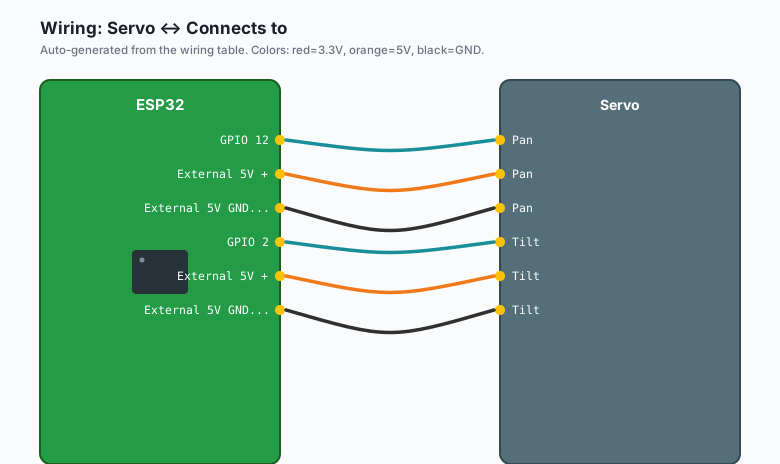
| Servo | Wire | Connects to |
|---|---|---|
| Pan | signal (orange) | GPIO 12 |
| Pan | power (red) | External 5V + |
| Pan | ground (brown) | External 5V GND and ESP32 GND |
| Tilt | signal (orange) | GPIO 2 |
| Tilt | power (red) | External 5V + |
| Tilt | ground (brown) | External 5V GND and ESP32 GND |
Common ground between servo supply and ESP32 is what makes the signal meaningful. The 1000 uF capacitor goes across the external 5V and GND rails, close to the servos.
The code
#include "esp_camera.h"
#include <WiFi.h>
#include <WebServer.h>
#include <ESP32Servo.h>

#define PAN_PIN 12
#define TILT_PIN 2

Servo panServo, tiltServo;
int panAngle = 90, tiltAngle = 90;

WebServer server(80);

// AI-Thinker pin map (same as the streaming tutorial)
// ... camera_config_t identical, see the streaming tutorial ...

void setup() {
  Serial.begin(115200);
  ESP32PWM::allocateTimer(0); ESP32PWM::allocateTimer(1);

  panServo.setPeriodHertz(50);
  tiltServo.setPeriodHertz(50);
  panServo.attach(PAN_PIN, 500, 2400);    // SG90 pulse range
  tiltServo.attach(TILT_PIN, 500, 2400);
  panServo.write(panAngle);
  tiltServo.write(tiltAngle);

  // camera init + wifi + server.on("/") for the stream, as before
  // ...
  server.on("/move", handleMove);
  server.begin();
}

void handleMove() {
  // /move?axis=pan&delta=-10
  int delta = server.arg("delta").toInt();
  if (server.arg("axis") == "pan") {
    panAngle = constrain(panAngle + delta, 0, 180);
    panServo.write(panAngle);
  } else {
    tiltAngle = constrain(tiltAngle + delta, 30, 150);   // limit tilt range
  }
  server.send(200, "application/json",
              "{\"pan\":" + String(panAngle) + ",\"tilt\":" + String(tiltAngle) + "}");
}

void loop() { server.handleClient(); }
The browser side: the stream page plus two rows of buttons that fetch
/move?axis=pan&delta=-10 (and +10), with a step of 5 or 10 degrees
per press. Small steps beat sliders: each click is an HTTP round trip,
and a slider fights the latency.
The jitter problem
SG90s jitter (hum and twitch) for two reasons:
- Power. Servos on the camera’s 5V rail twitch the camera. The external supply with the big capacitor is the fix, not optional.
- Detached servos. After the last move,
servo.detach()stops the pulse train and the servo goes quiet until the next command. Add detach 5 seconds after each move if the humming annoys you.
The bracket
The pan servo bolts to the base, its horn up. The tilt servo bolts to a bracket on the pan horn, camera on the tilt horn. Prints are everywhere (search “ESP32-CAM pan tilt”), but the honest version is a $2 acrylic pan/tilt kit from any electronics store, which takes 10 minutes to assemble and holds the camera with one screw.
What you learned
- GPIO 12 and 2 are the free pins on the ESP32-CAM for servos.
- Servo power is a separate rail; the capacitor absorbs the stall surge.
- Step-based web control beats sliders when every move is a round trip.
When something breaks
- Camera reboots when a servo moves: power rail. External supply, common ground, capacitor. This is the whole section above.
- Servo jitters at rest: pulse noise from the long signal wire, or detach it when idle.
- Camera points sideways at boot: the servo’s 90-degree center is wherever the horn was when you attached it. Set both servos to 90 in software, pop the horn, re-seat it level, screw it back.
- Tilt sags under camera weight: SG90 plastic gears vs a camera plus wires. A MG90S (metal gear) tilt servo is the $2 upgrade.
What to build next
- The streaming tutorial is the video half of this build.
- The QR code tutorial turns the aimed camera into a scanner.
- The book IoT with ESP32 bundles the camera tutorials.