ESP32: measure ambient light with the BH1750 lux sensor
Wire a BH1750 to an ESP32 over I2C and get real lux readings instead of a raw ADC number. The light sensor that works out of the box.
The BH1750 is the light sensor I reach for when I want an answer, not a ratio. It reads actual lux (the unit your phone’s screen brightness uses) over I2C. Two wires, done. The LDR photoresistor everyone starts with gives you a raw ADC number that changes with every board and every resistor you pair it with. The BH1750 gives you a number you can compare across projects.
This tutorial gets you a working lux meter in about 20 minutes.
What you need
- ESP32 dev board
- BH1750 breakout board (the GY-302 module is the common one, about $3)
- 4 jumper wires
The BH1750 is the right pick over an LDR when you care about the reading (e.g. automating blinds, checking if a room is bright enough for plants). It is calibrated, it does not drift, and it uses I2C so you do not burn an ADC pin. An LDR is still fine for “is it dark enough to turn the light on” projects where nobody sees the number.
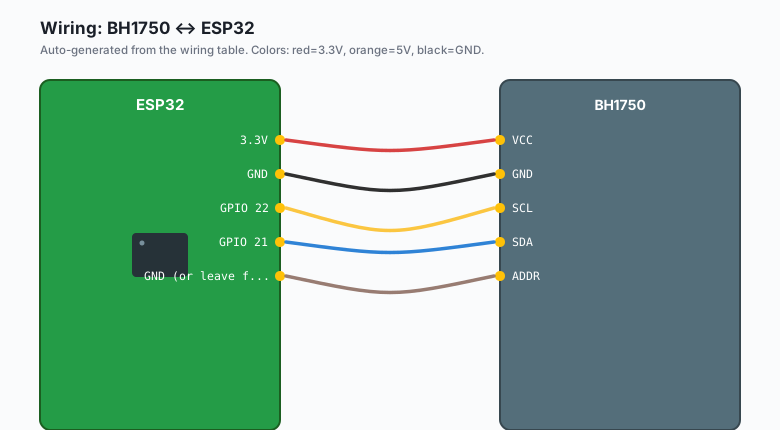
Wiring (I2C)
| BH1750 | ESP32 |
|---|---|
VCC | 3.3V |
GND | GND |
SCL | GPIO 22 |
SDA | GPIO 21 |
| ADDR | GND (or leave floating) |
The ADDR pin selects the I2C address. Floating or tied to GND puts the sensor at 0x23. Tie it to 3.3V and it moves to 0x5C (e.g. useful when you want two BH1750s on the same bus).
Install
Arduino IDE >> Sketch >> Include Library >> Manage Libraries, search “BH1750”, install the one by Christopher Laws.
The code
#include <Wire.h>
#include <BH1750.h>

BH1750 lightMeter;

void setup() {
  Serial.begin(115200);
  Wire.begin(21, 22);   // SDA, SCL

  if (lightMeter.begin(BH1750::CONTINUOUS_HIGH_RES_MODE)) {
    Serial.println("BH1750 ready");
  } else {
    Serial.println("BH1750 not found, check wiring");
    while (1) delay(1000);
  }
}

void loop() {
  float lux = lightMeter.readLightLevel();
  Serial.print("Light: ");
  Serial.print(lux);
  Serial.println(" lx");
  delay(1000);
}
Upload, open Serial Monitor at 115200. Cover the sensor with your hand and you should watch the number drop to near zero. Point it at a lamp and it climbs into the hundreds.
What the numbers mean
Lux readings only make sense with reference points (e.g. a dark room is under 10 lux, an office is around 300-500, direct sunlight is over 10,000):
| Reading | What it means |
|---|---|
| 0-10 lx | Dark, moonlight or a dark room |
| 10-100 lx | Dim indoor lighting |
| 100-500 lx | Normal indoor lighting |
| 500-1000 lx | Bright task lighting |
| 1000-10000 lx | Overcast day, or near a bright window |
| 10000+ lx | Direct sun |
The resolution modes
The library defaults to one-shot high-res mode, which gives you 1 lux
resolution with a 120 ms measurement time. If you are battery powered
and want speed, CONTINUOUS_HIGH_RES_MODE_2 trades resolution (0.5
lux) for half the measurement time. For a plant monitor or a blind
controller, the default is right and you should not think about it
again.
The trap I hit: in continuous mode the sensor reads constantly and the first reading after a mode change is stale. Read twice and throw the first one away, or just accept a one-reading lag at startup.
What you learned
- The BH1750 gives calibrated lux over I2C, no calibration step needed.
- ADDR pin selects between two I2C addresses.
- The pattern: init the sensor in setup(), read in loop(), done.
When something breaks
- “BH1750 not found”: run an I2C scanner first. If the address is 0x23 or 0x5C, wiring is fine and the begin() call is wrong. If you see nothing at all, SDA and SCL are swapped.
- Readings stuck at -1 or 0: the sensor is in one-shot mode and you are reading too fast. Add a delay or switch to continuous mode.
- Readings jump around wildly: your jumper wires are too long for the I2C bus. Shorten them or slow the bus clock down.
What to build next
- Pair this with the relay module tutorial and you have a light that turns itself on at dusk.
- The plant monitor project uses soil moisture, but the BH1750 tells you whether the plant is actually getting sun.
- The book IoT with ESP32 bundles this with the other sensor tutorials.