Arduino: location and time from a NEO-6M GPS module
Read latitude, longitude, and the exact UTC time from a $12 NEO-6M GPS module over serial. Wiring, the TinyGPS++ library, and why the fix takes 5 minutes outside.
A NEO-6M module is the cheapest way to give an Arduino two things that are hard to get any other way: where it is, and what time it is, to the second, with no internet and no RTC battery to drift. The satellite part is free and never needs an account.
I built one into a mailbox notifier a while back and learned the trap on day one: indoors, next to a window that faces a parking garage, the module sees two satellites and locks onto nothing. The fix is not code. The fix is a window facing the sky, or better, the balcony for five minutes while it gets its first fix. GPS modules want sky, and the first fix after a cold start can take 5 to 15 minutes even outside (e.g. the module downloads the satellite almanac and remembers it on its coin cell for next time).
The other trap: the four pins on the little blue board are labeled in 1.5 mm letters and everyone wires RX to RX. The module’s TX goes to the Arduino’s RX. Crossed, always.
What you need
Needed
| Item | Qty | Purpose | Est. cost |
|---|---|---|---|
| Arduino Uno or Nano | 1 | the brain | $10-$25 |
| NEO-6M GPS module with ceramic antenna | 1 | position + time | $10-$13 |
| Jumper wires (female-female help) | 4 | serial connection | $3 |
That is the whole build. The module with the square white ceramic antenna is the standard one; the u-blox NEO-6M chip is on board and the antenna screws or plugs onto the u.fl connector on the better versions.
Nice to have
- USB-serial adapter (e.g. to talk to the GPS directly from a laptop and see raw NMEA sentences while debugging)
- Soldering iron and solder if your module came with a bare pin header you need to attach
- Helping hands for holding the header straight while it cools
Wiring
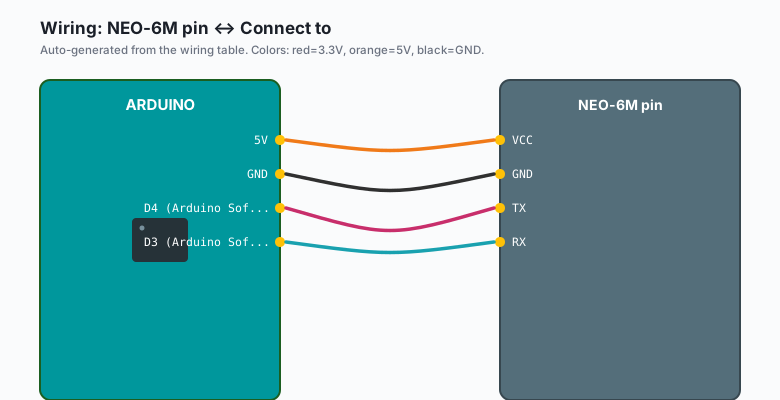
Serial only, two data wires plus power:
| NEO-6M pin | Connect to |
|---|---|
VCC | 5V |
GND | GND |
TX | D4 (Arduino SoftwareSerial RX) |
RX | D3 (Arduino SoftwareSerial TX) |
The NEO-6M is a 3.3V device at heart, but the common blue breakout boards have a regulator and level shifting, so 5V on VCC is fine and the TX pin swings 3.3V, which an Uno reads as HIGH without complaint. Bare modules without a breakout are a different story; check for the regulator chip before you wire it.
Use pins 3 and 4, not 0 and 1: pins 0 and 1 are the USB serial port, and the IDE will refuse uploads while your GPS is wired to them.
Install
TinyGPS++ handles the NMEA parsing. Sketch >> Include Library >> Manage Libraries >> search “TinyGPSPlus” >> install the one by Mikal Hart (spelled TinyGPSPlus, no space).
SoftwareSerial ships with the IDE, nothing to install there.
The code
#include <TinyGPSPlus.h>
#include <SoftwareSerial.h>

static const int RX_PIN = 4;   // Arduino reads here: GPS TX -> D4
static const int TX_PIN = 3;   // Arduino transmits here: GPS RX <- D3
static const uint32_t GPS_BAUD = 9600;

TinyGPSPlus gps;
SoftwareSerial gpsSerial(RX_PIN, TX_PIN);

void setup() {
  Serial.begin(115200);
  gpsSerial.begin(GPS_BAUD);
  Serial.println("Waiting for fix. Outside helps. A lot.");
}

void loop() {
  while (gpsSerial.available() > 0) {
    gps.encode(gpsSerial.read());
  }

  static unsigned long lastPrint = 0;
  if (millis() - lastPrint > 2000 && gps.location.isUpdated()) {
    lastPrint = millis();

    if (gps.location.isValid()) {
      Serial.print("Lat: ");  Serial.println(gps.location.lat(), 6);
      Serial.print("Lng: ");  Serial.println(gps.location.lng(), 6);
      Serial.print("Alt m: "); Serial.println(gps.altitude.meters(), 1);
      Serial.print("Sats: "); Serial.println(gps.satellites.value());
    } else {
      Serial.print("No fix yet. Sats seen: ");
      Serial.println(gps.satellites.isValid() ? gps.satellites.value() : 0);
    }

    if (gps.time.isValid()) {
      // UTC. Subtract your offset for local (e.g. UTC-7 for Mountain time)
      char buf[12];
      sprintf(buf, "%02d:%02d:%02d",
              gps.time.hour(), gps.time.minute(), gps.time.second());
      Serial.print("UTC time: ");
      Serial.println(buf);
      Serial.print("Date: ");
      Serial.print(gps.date.month()); Serial.print("/");
      Serial.print(gps.date.day());   Serial.print("/");
      Serial.println(gps.date.year());
    }
  }
}
Upload it, open the Serial Monitor at 115200, and put the antenna
somewhere it can see sky. First line of interest takes a few minutes on
a cold start and a few seconds after that. When Sats: climbs past 4
you have a fix worth trusting.
The pattern in one sentence: bytes flow into gps.encode(), and the
library turns them into ready-to-read objects whenever you like.
Why GPS time is worth the trouble
An RTC keeps time between power cuts. GPS hands you the actual time, every second, from an atomic-clock-backed signal. For logging projects that is the difference between “roughly when” and “admissible evidence” (e.g. a freezer temperature log where the timestamp has to mean something).
The DS3231 RTC tutorial covers the between-power-cuts side. The two pair well: GPS sets the DS3231 once an hour, DS3231 covers the gaps.
What you learned
- GPS gives position, altitude, and UTC time over plain serial.
- Cross the TX/RX wires and keep them off pins 0 and 1.
- TinyGPS++ parses NMEA;
isValid()is the check before trusting anything. - First fix takes minutes outdoors and never works through a roof.
When something breaks
- Nothing on serial at all: TX and RX are swapped, or the module is wired to pins 0 and 1 and uploads fail too. Swap the two wires, both problems go away.
- Serial shows gibberish: baud mismatch. The NEO-6M ships at 9600
and some sellers reconfigure to 115200. Drop the rate to 4800, then
9600, then 19200 in
gpsSerial.begin()until text appears. - No fix after 20 minutes indoors: not a bug. Take it outside, or at least to a windowsill facing open sky. Metal roofs and parking garages block it entirely.
- Fix works, then drifts and drops: the antenna cable worked loose, or the active antenna (if you added one) is not getting power. Check the u.fl connector; it is the flimsiest part of the whole module.
- Time is right but the date is 2000-something: the module has a fix on time but not enough satellites for the full almanac. Wait, or move. The date fills in once position locks.
What to build next
- A speedometer:
gps.speed.kmph()plus a small OLED (the LCD I2C tutorial shows the wiring) makes a dashboard for anything that moves. - Pair with the DS3231 RTC clock tutorial so a data logger keeps accurate timestamps with and without sky.
- Add ntfy notifications from the ESP32 tutorials: “mailbox opened at 14:32:07, 40.7128 N” is a better alert than one without a location.
The book Arduino Robotics bundles this with the motor and encoder tutorials for a full GPS-guided rover chapter.