Pico: log sensor data to microSD with timestamps
Wire a microSD card to a Pico over SPI and write timestamped CSV sensor logs that survive power loss. The offline data logger pattern.
When the sensor is in the greenhouse, the crawlspace, or the beehive, Wi-Fi is not always there to receive your data. The microSD card is the offline answer: GBs of storage for $8, no network, and the log survives power loss because it is a file on disk.
This tutorial gets a Pico writing timestamped CSV rows to an SD card, with the file-handling details (open, flush, close) that decide whether your data survives.
What you need
- Raspberry Pi Pico
- microSD card module with SPI interface (the $2 one with the 6-pin header: VCC, GND, MISO, MOSI, SCK, CS)
- A microSD card (any brand, 2-32 GB, FAT32 formatted)
- Jumper wires
Why the SPI module over the Pico’s SDIO: the RP2040’s MicroPython build exposes SPI simply and everywhere, and 1 reading a minute does not need SDIO speed. SPI it is.
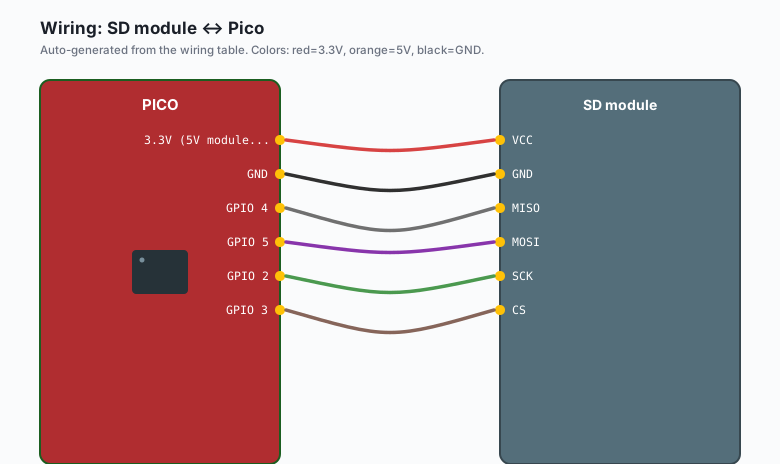
Wiring (SPI0)
| SD module | Pico |
|---|---|
VCC | 3.3V (5V modules: check for onboard regulator first) |
GND | GND |
MISO | GPIO 4 |
MOSI | GPIO 5 |
SCK | GPIO 2 |
CS | GPIO 3 |
Setup
Thonny >> Tools >> Manage packages, install sdcard (and os is
built in). Mounting is three lines:
import machine, sdcard, os

spi = machine.SPI(0, baudrate=1_000_000, polarity=0, phase=0,
                  sck=machine.Pin(2), mosi=machine.Pin(5), miso=machine.Pin(4))
sd = sdcard.SDCard(spi, machine.Pin(3))
os.mount(sd, "/sd")
print(os.listdir("/sd"))
Timestamps without an RTC
The Pico has no battery-backed clock. MicroPython’s time.localtime()
starts at zero every boot. Two fixes:
| Route | How | Drift |
|---|---|---|
| Sync at boot | ntptime.settime() when Wi-Fi is up (Pico W) | None while powered |
| Relative time | Log ticks_ms() and your own session counter | Never wrong, just relative |
For most logger projects, one of these is enough: sync time from NTP when you configure it, log session-elapsed otherwise, and set the absolute clock when you pull the card. The trap is mixing them (e.g. half a file in epoch-relative seconds and half in NTP absolute).
The code
import machine, sdcard, os, time

# mount (as above)
spi = machine.SPI(0, baudrate=1_000_000,
                  sck=machine.Pin(2), mosi=machine.Pin(5), miso=machine.Pin(4))
sd = sdcard.SDCard(spi, machine.Pin(3))
os.mount(sd, "/sd")

sensor = machine.ADC(26)   # whatever sensor you have on ADC0

LOG = "/sd/log.csv"

def write_row(t, value):
    # append mode; "a" creates the file if missing
    with open(LOG, "a") as f:
        f.write(f"{t},{value}\n")
        f.flush()   # push to the card NOW, not eventually

# header if the file is fresh
try:
    os.stat(LOG)
except OSError:
    with open(LOG, "w") as f:
        f.write("timestamp,reading\n")

t0 = machine.ticks_ms()
n = 0
while True:
    value = sensor.read_u16()
    elapsed = machine.ticks_diff(machine.ticks_ms(), t0) // 1000
    write_row(elapsed, value)
    print("logged", elapsed, value)
    time.sleep(60)
Run it, wait two minutes, stop the program, and check os.listdir("/sd")
then the file content. Rows are there, and they stay after you unplug
the board.
The durability rules
- Open, write, flush, close every time. The
withblock does this and the flush is the line that matters (e.g. without it, data sits in RAM until some later close, and a power cut takes it with it). - Append, do not rewrite. Opening “w” each time truncates the whole history. Open “a”.
- Buffer in RAM, write in batches, but flush at shutdown. If you are on battery, batching 20 readings per write saves wear and time; catch the power-down (brownout or a button) and flush then.
Card capacity math
A CSV row is about 20 bytes. One reading per minute is 10 MB per
year. The smallest SD card you can buy outlives the project. Card wear
is real but slow at this rate; at 10 readings per second you want a
bigger card and daily file rotation (log-001.csv per day, index in
the name).
What you learned
- SD over SPI with the sdcard module: mount once, then it is files.
- The with-open-append-flush pattern is what makes logs survive.
- Timestamp strategy: NTP if networked, elapsed time if not.
When something breaks
- OSError on mount: card is FAT32? Some cards ship exFAT. Format FAT32 on a computer first. Also check CS pin number matches wiring.
- Mounts but writes vanish: you skipped flush, or you are writing before mount finished. The with-block plus flush is the fix.
- Readings corrupt after hours: SPI wires longer than 15 cm pick up noise at 1 MHz. Shorten them or drop the baudrate to 400 kHz.
- Card fills silently: log rotation is on you. Check file size in the loop and start log-002.csv when log-001.csv passes a size you pick (e.g. 1 MB per file is manageable on pull).
What to build next
- The asyncio tutorial runs this logger, a status LED, and a web page at the same time.
- The SQLite on Raspberry Pi tutorial is the networked version of the same idea.
- The book Pico and MicroPython bundles the foundations.