ESP32: LoRa peer-to-peer, two boards talking without Wi-Fi
Wire two ESP32 boards to SX1278 LoRa modules and send packets between them with no Wi-Fi, no internet, no gateway. The wiring, the Sandeep Mistry library, sender code, receiver code, and the urban range truth.
I wired two ESP32 boards to SX1278 LoRa modules last fall to test if a sensor in my shed could reach the house without a Wi-Fi extender. It could. About 600 feet through two walls, line of sight at maybe 70%. The surprise was not the range, it was how short the code turned out to be: 30 lines on each board, and the two boards talked all afternoon on a pair of AA batteries. The trap I want to be honest about is the packet size. LoRa is slow. You can send a sensor reading, but you cannot send a photo. Treat it like a walkie-talkie, not like Wi-Fi.
This tutorial is ESP32 only. LoRa modules like the SX1276, SX1277, SX1278, and SX1279 all speak the same SPI protocol and the same Arduino library works on all of them. The library is chip-specific to the Semtech silicon, not to the ESP32. The reason ESP32 is the easiest host is that it has plenty of flash and hardware SPI that just works. You can put the same code on a Raspberry Pi Pico with some pin shuffling, but the library examples all assume ESP32.
What LoRa is, in one paragraph
LoRa is a sub-GHz radio modulation scheme from Semtech. The “LoRa” name is the physical layer, which is what makes the range claim possible. Chirp spread spectrum lets a tiny radio module punch through walls and trees at low power, in the unlicensed ISM bands (the 433 MHz, 868 MHz, and 915 MHz slots, depending on what country you are in). The data rate is tiny: 0.3 kbps to 50 kbps depending on the spreading factor you pick. That is the trade. You give up speed and you get range.
The chips you actually buy are the Semtech SX1276 (covers 137-525 MHz, so includes 433 MHz), the SX1277 (the 433 MHz specialist), the SX1278 (the 868/915 MHz specialist, the one most boards ship with), and the SX1279 (covers everything). On AliExpress, every “LoRa module” labeled “SX1278” is fine. The “RA-02” form factor is the most common: a small green breakout with an SMA edge connector and a spring antenna.
The bands matter. 433 MHz is legal in Europe and most of Asia, illegal in North America. 868 MHz is legal in Europe. 915 MHz is legal in the US, Australia, and parts of Asia. If you buy a 433 MHz module and run it in the US, you are technically out of band, and your range is bad because you picked a frequency that does not propagate well in your region’s noise floor. Pick the band for your country.
What you need
- 2x ESP32 dev boards (e.g. ESP32-DevKitC v4, or any board with the ESP32-WROOM module)
- 2x SX1278 LoRa modules with spring antennas (the RA-02 form factor, $3 each)
- Jumper wires, ideally with the right length to put the antennas apart
- USB cables to program both boards
- 2x laptops, or one laptop and you swap the USB cable back and forth during testing
The SX1278 is the right pick over the SX1276 unless you specifically need 433 MHz. Both work, the SX1278 is cheaper, and every example on the internet targets the SX1278. The RA-02 is the right pick over the bare chip because the spring antenna is already soldered and the SMA footprint is there if you want to upgrade later.
Wiring
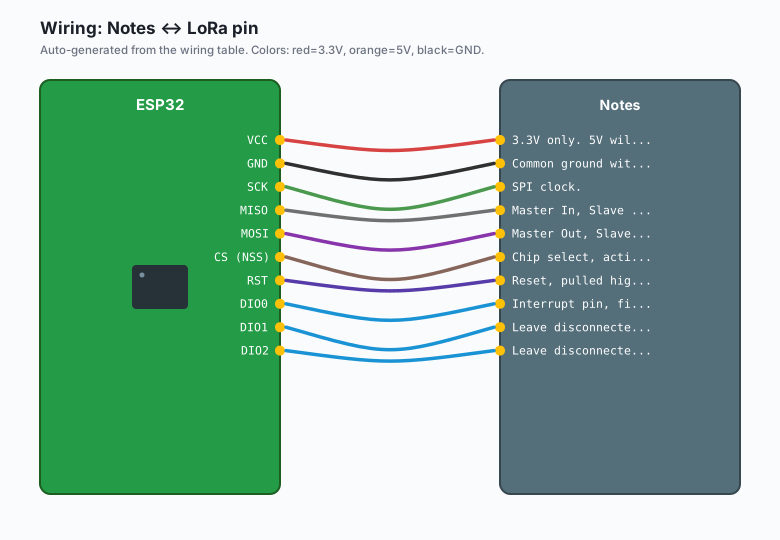
Each ESP32 connects to its LoRa module over SPI. The pin map below is the one every Sandeep Mistry example uses, and the one you will see on most “ESP32 LoRa” board variants (Heltec LoRa 32, TTGO T-Beam, LilyGo LoRa32) wired exactly this way:
| LoRa pin | ESP32 pin | Notes |
|---|---|---|
VCC | 3V3 | 3.3V only. 5V will cook the chip. |
GND | GND | Common ground with the ESP32. |
SCK | GPIO 18 | SPI clock. |
MISO | GPIO 19 | Master In, Slave Out. |
MOSI | GPIO 23 | Master Out, Slave In. |
CS (NSS) | GPIO 5 | Chip select, active LOW. |
RST | GPIO 14 | Reset, pulled high after init. |
| DIO0 | GPIO 26 | Interrupt pin, fires on packet received. |
| DIO1 | (unused) | Leave disconnected. |
| DIO2 | (unused) | Leave disconnected. |
On Heltec and TTGO boards, the pins are hard-wired on the PCB. You do not get to choose them. The table above is the default for the ESP32-DevKitC with a bare RA-02 module. If you are on a Heltec LoRa 32, the LoRa module is on the back of the board and you just plug in USB.
Common ground matters. If the ESP32 and the LoRa module do not share a ground, the SPI bus floats and you get garbage packets or no packets.
Install
The library is Sandeep Mistry’s LoRa library. Install it the usual Arduino way: Sketch >> Include Library >> Manage Libraries >> search “LoRa” by Sandeep Mistry >> Install. Pick version 0.8.0 or later. The library wraps the Semtech SX127x register writes in a friendly API (e.g. LoRa.begin(), LoRa.beginPacket(), LoRa.endPacket()).
If you prefer the command-line build with arduino-cli or PlatformIO, the library is sandeepmistry/loRa. The library ID is LoRa.
The sender code
#include <SPI.h>
#include <LoRa.h>

int counter = 0;

void setup() {
  Serial.begin(115200);
  while (!Serial) { ; }

  // CS, RST, DIO0 in that order. These are the defaults from the table above.
  if (!LoRa.begin(915E6)) {  // 915 MHz for US/AU. Use 868E6 for EU, 433E6 for Asia.
    Serial.println("LoRa init failed. Check wiring.");
    while (1) { ; }
  }
  LoRa.setSpreadingFactor(7);      // SF7 = fast, short range. SF12 = slow, long range.
  LoRa.setSignalBandwidth(125E3);   // 125 kHz is the default. Lower = longer range.
  LoRa.setTxPower(14);              // dBm. 14 is safe for bare modules; 20 needs PA boost.
}

void loop() {
  Serial.print("Sending packet: ");
  Serial.println(counter);

  LoRa.beginPacket();
  LoRa.print("hello ");
  LoRa.print(counter);
  LoRa.endPacket();

  counter++;
  delay(5000);
}
The spreading factor is the main knob. SF7 is fast (about 5.5 kbps) and short range. SF12 is slow (about 250 bps) and long range. For “two boards in the same house” you want SF7. For “sensor in a shed 600 feet away with two walls” you want SF9 or SF10. SF12 is for when you want the absolute maximum range and you do not care that a 50-byte packet takes 3 seconds to send.
The receiver code
#include <SPI.h>
#include <LoRa.h>

void setup() {
  Serial.begin(115200);
  while (!Serial) { ; }

  if (!LoRa.begin(915E6)) {
    Serial.println("LoRa init failed. Check wiring.");
    while (1) { ; }
  }
  LoRa.setSpreadingFactor(7);
  LoRa.setSignalBandwidth(125E3);
  LoRa.setTxPower(14);
  LoRa.onReceive(onReceive);
  LoRa.receive();  // put the radio in RX mode
}

void onReceive(int packetSize) {
  Serial.print("Received packet: '");
  while (LoRa.available()) {
    Serial.print((char)LoRa.read());
  }
  Serial.print("' with RSSI ");
  Serial.println(LoRa.packetRssi());
}

void loop() {
  // Nothing to do. The radio fires onReceive() via interrupt when a packet arrives.
}
LoRa.onReceive() registers a callback that runs whenever DIO0 fires (i.e. the radio got a packet). LoRa.packetRssi() returns the signal strength in dBm. Anything above -100 dBm is a real signal. Below -110 dBm is mostly noise. RSSI is your one debug knob for range: walk around with the receiver and watch the number.
Range expectations, honestly
The “LoRa has 10 km range” claim is true under perfect conditions: line of sight from a hilltop, with the antenna high, in the rain (rain actually helps at sub-GHz). In the city it is 1-3 km, and that is being generous. Through two walls at 70 feet, expect -85 to -95 dBm. Through five walls at 200 feet, expect packet loss.
For the “sensor in the shed” use case, this is plenty. For the “send a message across a farm” use case, you want SF10 or SF12, a real antenna (not the spring), and the LoRa module outside or near a window. For the “send a message across a city” use case, you want Meshtastic or LoRaWAN, not bare peer-to-peer. Meshtastic handles the mesh routing. LoRaWAN handles the gateway network. Peer-to-peer does neither.
The packet size gotcha
LoRa packets bigger than about 50 bytes take a long time to send, especially at SF9 or higher. The math is rough but real: at SF7, a 50-byte packet takes about 200 ms on air. At SF12, the same packet takes about 3 seconds on air. The radio can do one thing at a time, so for those 3 seconds, the receiver cannot send and you cannot do anything else.
This is the reason most LoRa payloads are sensor readings (e.g. temperature, battery voltage, a button press). If you try to send a JSON object with 20 fields, you are doing it wrong. Pick a tiny serialization format (CBOR, MessagePack, or just a fixed-width binary struct) and keep payloads under 64 bytes. If you need more bandwidth, you are not building a LoRa project.
You need two boards, sorry
LoRa peer-to-peer is symmetric. There is no “client” and “server” in the way Wi-Fi has. Both sides have a radio, both sides can send, both sides can receive. If you have one board, you cannot test anything. If you have two, you can. This is the part that trips up people who are used to Wi-Fi, where you have a router and a client. Buy two boards up front. You will use both.
When to use peer-to-peer vs LoRaWAN vs Meshtastic
Use peer-to-peer LoRa when:
- You have two or a few devices that need to talk to each other directly.
- You do not want a hub, a gateway, or an account.
- The data is tiny and infrequent.
- The two nodes are within range of each other (no relay needed).
Use LoRaWAN when:
- You have many devices (10+) that all need to report to one central place.
- You want the gateway to forward packets to a network server (e.g. The Things Network).
- You are willing to register devices, manage keys, and pay for cellular backhaul if you run a private network server.
Use Meshtastic when:
- You want messages to hop between boards (mesh routing).
- You want the encryption, deduplication, and packet handling handled for you.
- You are willing to flash Meshtastic firmware and use the Meshtastic app on your phone.
Peer-to-peer is the simplest of the three. It is also the dumbest: if the receiver is off, the packet is lost. LoRaWAN and Meshtastic both add a network layer on top of the LoRa physical layer. For a hobby project with two boards, peer-to-peer is the right pick. For anything more, move up.
What you learned
- LoRa is a long-range, low-power radio modulation on the 433/868/915 MHz bands.
- Wiring is SPI: SCK, MISO, MOSI, CS, plus RST, DIO0, 3V3, GND.
- The Sandeep Mistry
LoRalibrary gives youbeginPacket()/print()/endPacket()on the sender, andonReceive()/packetRssi()on the receiver. - Range in the city is 1-3 km, line of sight can be 10 km, packet size should stay under 64 bytes.
- You need two boards; one board cannot test anything.
When something breaks
LoRa init failed. Check the wiring. The most common cause is CS or RST on the wrong pin, or VCC connected to 5V instead of 3V3. The RA-02 is a 3.3V module. 5V will let the magic smoke out.Received packetwith garbage bytes. The two boards are on different frequencies (one on 868, one on 915), or the spreading factors do not match. Both boards must callLoRa.begin()with the same frequency and both must callsetSpreadingFactor()with the same value.- No packets received at all. Check the antennas. The spring antenna must be soldered to the SMA pad, and the boards must be at least a foot apart (a radio right next to its own antenna will desensitize itself). Also check that the receiver is in RX mode (it called
LoRa.receive()). - Packets drop above 50 bytes. That is the air-time math, not a bug. Lower the spreading factor or shorten the payload.
A note on duty cycle and the law
Most countries have a regulatory limit on how much airtime you can use in a given window. The 868 MHz band in Europe has a 1% duty cycle limit. The 915 MHz band in the US has a 400 ms channel dwell limit. The 433 MHz band in most countries is similarly restricted. The Sandeep Mistry library does not enforce any of this for you. If you set up two boards sending packets every 5 seconds on 868 MHz, you are out of spec after about 50 minutes and your friendly regulator will be unhappy.
For a hobby project, this does not matter. For a product, it matters a lot. Read your local ISM band rules before shipping. The LoRa Alliance has a reasonable summary at their website, and the ETSI rules for 868 MHz are public.
What to build next
- The natural next project is a sensor node that sends readings every 5 minutes. Add a BME280 or a soil moisture sensor, send the reading every 5 minutes, and run the whole thing on a 18650 battery with deep sleep.
- A book that bundles this with Meshtastic and LoRaWAN would be the right place to learn the “when to use which” decision in full.
—Brian